

Legacy modernization rarely fails because a team “picked the wrong framework.” It fails because the system is a museum of real business decisions: edge-case rules no one remembers, integrations that only break at 2 a.m., and data that behaves differently depending on which report is asking.
Those traps don’t just slow delivery — they turn every change into an operational bet.
The cost of staying in “we’ll modernize later” mode is very real. A Pegasystems study (conducted by Savanta, 500+ IT decision makers) reported that the average global enterprise wastes more than $370M per year because of technical debt and legacy inefficiencies. In that survey, the biggest cost driver was the time spent on traditional legacy transformation work — plus the price of failed modernization attempts and ongoing maintenance. That’s why the most practical approach is to treat modernization as risk management first, and code changes second.
Most teams underestimate the real challenges in legacy modernization until production exposes what plans miss: hidden integrations, brittle data rules, and risky cutovers. This guide makes those legacy modernization challenges visible early and shows how to reduce them.
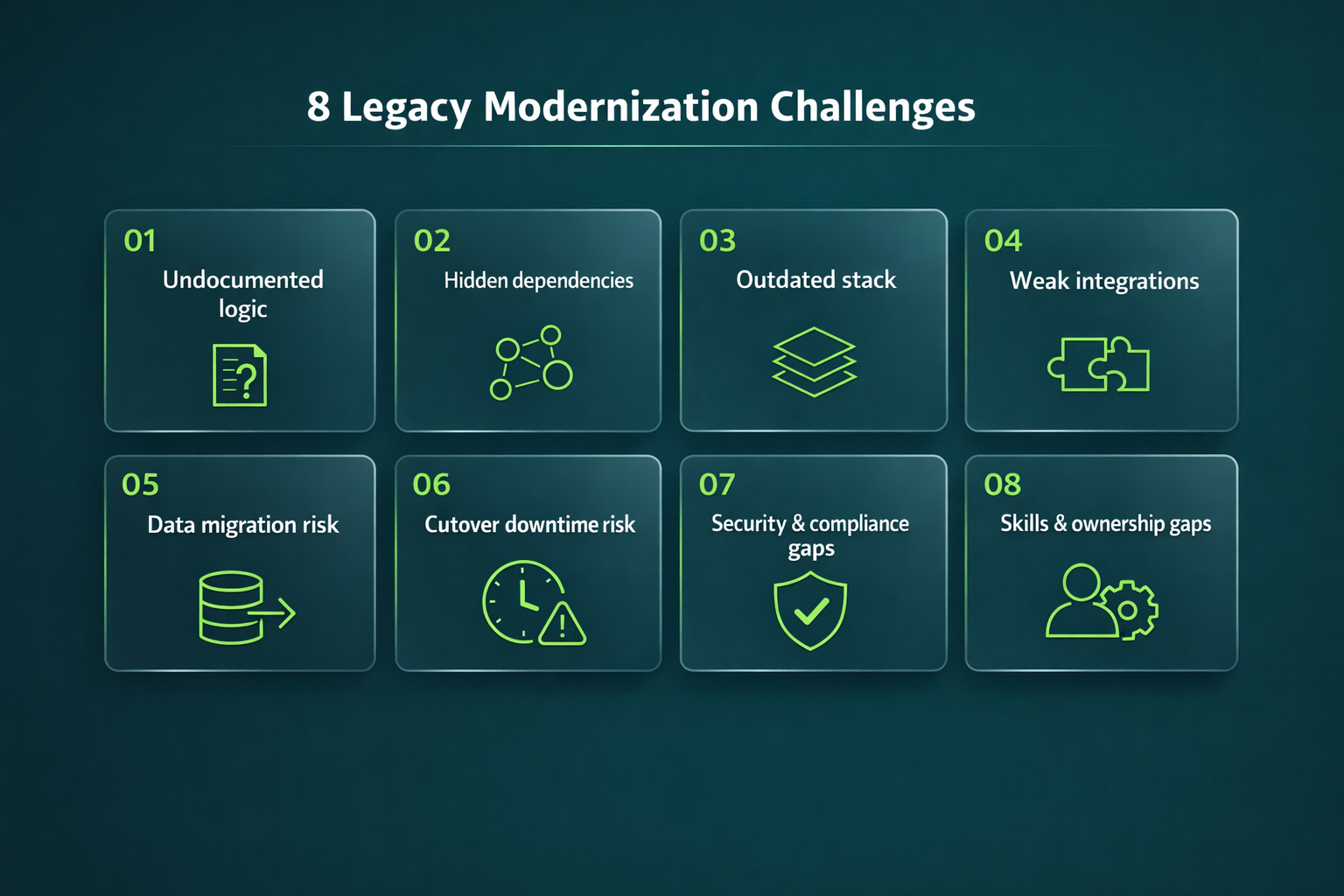
Below are the most common challenges in legacy system modernization grouped into eight buckets. For each one: What it is → Why it happens → What to do.
Legacy system modernization challenges: the 8 challenge buckets
1 Challenge: Undocumented logic
What it is: Core business rules exist only in code paths and “tribal knowledge.” Nobody can confidently explain why certain exceptions, thresholds, or pricing rules exist — but they’re critical.
Why it happens: Legacy systems evolve for years through hotfixes, urgent patches, and staff turnover. Documentation becomes stale, and “it works” replaces a formal spec.
What to do: Run a short discovery sprint before touching architecture. Map the top business workflows, convert them into decision tables and acceptance tests, and validate them against production behavior. The goal is a living “behavior spec” that can’t be forgotten.
2 Challenge: Hidden dependencies
What it is: The application silently depends on batch jobs, shared DB tables, file drops, internal scripts, vendor connectors, or “temporary” integrations that became permanent.
Why it happens: Long-lived systems accumulate integrations without governance. Over time, teams stop noticing them because they rarely fail — until you move one piece.
What to do: Create a dependency inventory using multiple signals: runtime traffic analysis, logs, tracing (where possible), code scanning, and stakeholder interviews. Then rank dependencies by business criticality and failure impact, and define contracts (APIs/events) before refactoring.
3 Challenge: Outdated stack
What it is: End-of-life runtimes, OS versions, frameworks, and libraries that are hard to patch or integrate with modern tooling.
Why it happens: Upgrades feel risky and non-urgent, so they get postponed — until they become a forced migration project.
What to do: Build an EOL map for runtimes, OS, frameworks, and key libraries — and tie it to security posture and vendor deadlines. Microsoft ended Windows 10 support on Oct 14, 2025 — a simple reminder that “stable” quickly turns into an exposure surface.
4 Challenge: Weak integrations
What it is: Point-to-point integrations are brittle, tightly coupled, and poorly observed (shared DB access, fragile file formats, undocumented contracts).
Why it happens: Older systems were built for internal workflows, not an API-first ecosystem. Integrations grew organically and became a spiderweb.
What to do: Introduce an integration layer: stable APIs, event streams where appropriate, contract testing, and clear ownership. Add observability so integration failures become visible and diagnosable instead of “random incidents.” This is one of the most common challenges in legacy system modernization because it directly affects downtime risk.
5 Challenge: Data migration risk
What it is: Data quality problems, inconsistent schemas, unclear ownership, and “surprise” transformations that break reporting and workflows.
Why it happens: Legacy databases often encode business logic (magic values, flags, denormalized shortcuts). Over years, data drift becomes normal.
What to do: Treat migration like a product with acceptance criteria: completeness, correctness, and performance. Start with profiling, define canonical entities, and plan reconciliation (before/after checks). Use staged approaches (CDC, dual-read/dual-write when possible) to reduce blast radius. Data issues are among the most expensive legacy app modernization challenges because errors are hard to detect and harder to roll back.
6 Challenge: Cutover downtime risk
What it is: The switch to the new system causes outages, degraded performance, or operational chaos — and rollback isn’t as easy as it looked in the plan.
Why it happens: Teams underestimate rollback complexity, rely on “happy path” testing, and lack real-time visibility during transition.
What to do: Prefer staged rollout strategies: blue-green, canary releases, feature flags, and rehearsed cutover runbooks. IBM describes blue-green deployment as a technique designed to eliminate downtime and enable fast rollback. If “minimal downtime” is a business requirement, your release strategy must be designed for it from day one.
7 Challenge: Security and compliance gaps
What it is: Weak access control, outdated crypto, missing audit logs, vulnerable dependencies, and compliance drift during transition.
Why it happens: One of the key disadvantages of legacy systems is that they often rely on outdated components that are unmaintained or cannot be patched properly. OWASP explicitly highlights “vulnerable and outdated components” as a major risk category.
What to do: Make security gates non-negotiable: threat modeling, SAST/DAST where applicable, dependency scanning/SBOM, secrets management, least privilege, and audit logging. Confirm compliance constraints (PII/PCI/HIPAA/GDPR etc.) before architecture decisions lock you in. Security is not a “final hardening phase” — it’s a design input.
8 Challenge: Skills and ownership gaps
What it is: You need expertise in old tech and modern architecture at the same time, but nobody clearly owns the domain, and hiring for legacy skills is difficult.
Why it happens: Over time systems become “everyone’s responsibility,” which means they’re effectively nobody’s. Another disadvantage of legacy systems is that they increase organizational dependency on a shrinking talent pool.
What to do: Assign explicit product and technical ownership, define decision makers, and run a skills gap assessment early. Pair internal staff with specialists, produce runbooks, and build a transition plan so knowledge doesn’t disappear after go-live.
Choosing the right modernization path
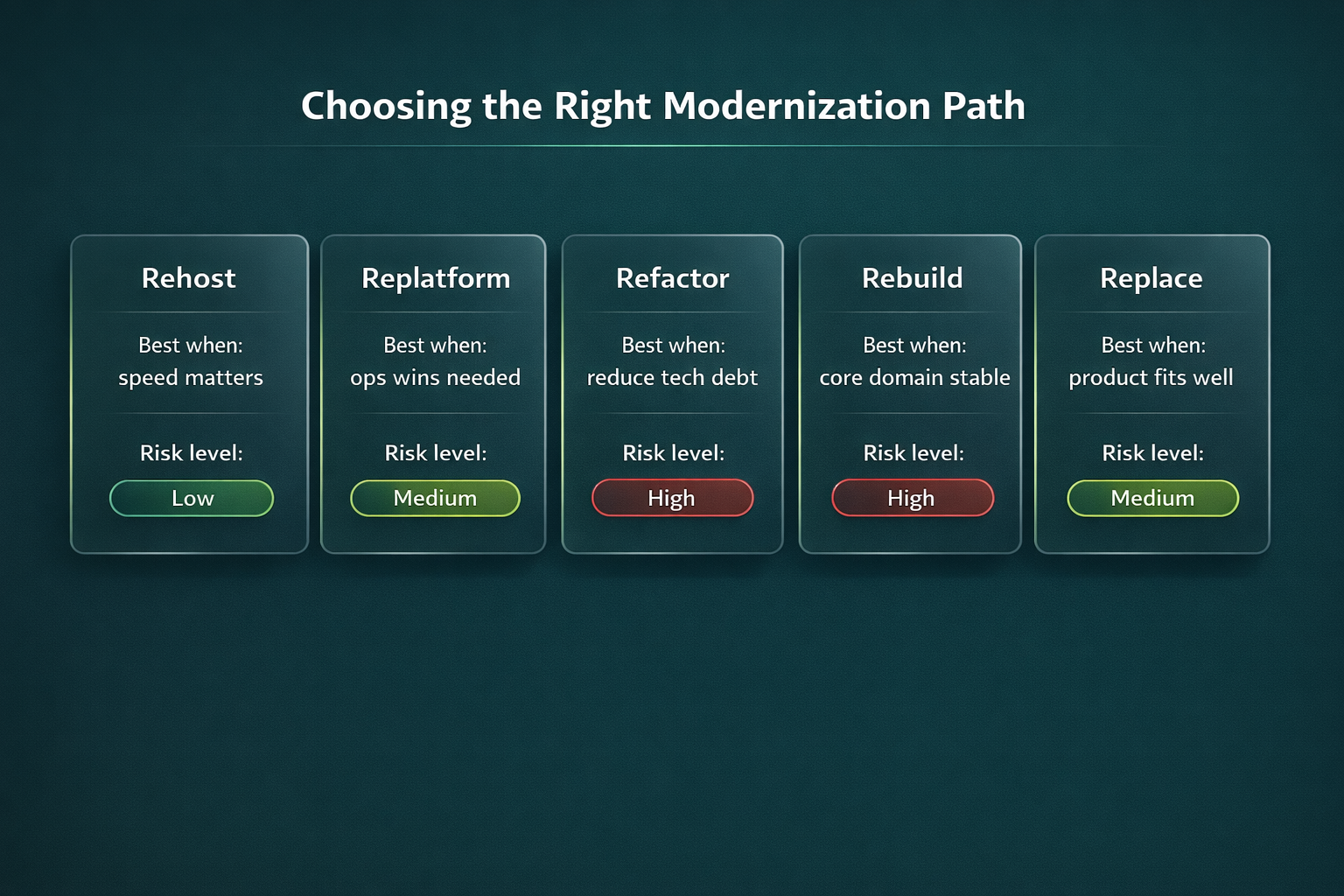
Many challenges in legacy modernization come from choosing a path that doesn’t match reality. A quick way to decide:
- Rehost when you need speed and minimal code change (but don’t expect major quality improvements).
- Replatform when you want operational wins using managed services without rewriting everything.
- Refactor when you must reduce technical debt, improve maintainability, and unlock performance/security.
- Rebuild when the domain is stable but the implementation blocks progress.
- Replace when a modern product fits and heavy customization isn’t required.
If you want a deeper breakdown of tradeoffs and when each approach makes sense, use this guide: legacy modernization strategies.
A low-risk modernization approach
The lowest-risk pattern is incremental: isolate the riskiest areas, modernize around the edges, and deliver value in small releases instead of one “big bang.” This reduces cutover downtime risk, makes hidden dependencies easier to handle, and helps manage legacy system modernization challenges step by step.
Here’s the detailed playbook: a low-risk modernization approach.
Reducing modernization risk requires more than automated refactoring tools. It demands structured system assessment, dependency mapping, regression safeguards, phased migration, and architectural oversight.
A disciplined AI-driven legacy modernization approach combines AI-assisted code analysis with governance and controlled rollout strategies. This significantly lowers the likelihood of hidden regressions, undocumented behavior changes, and long-term architectural instability.
Practical checklist before you start
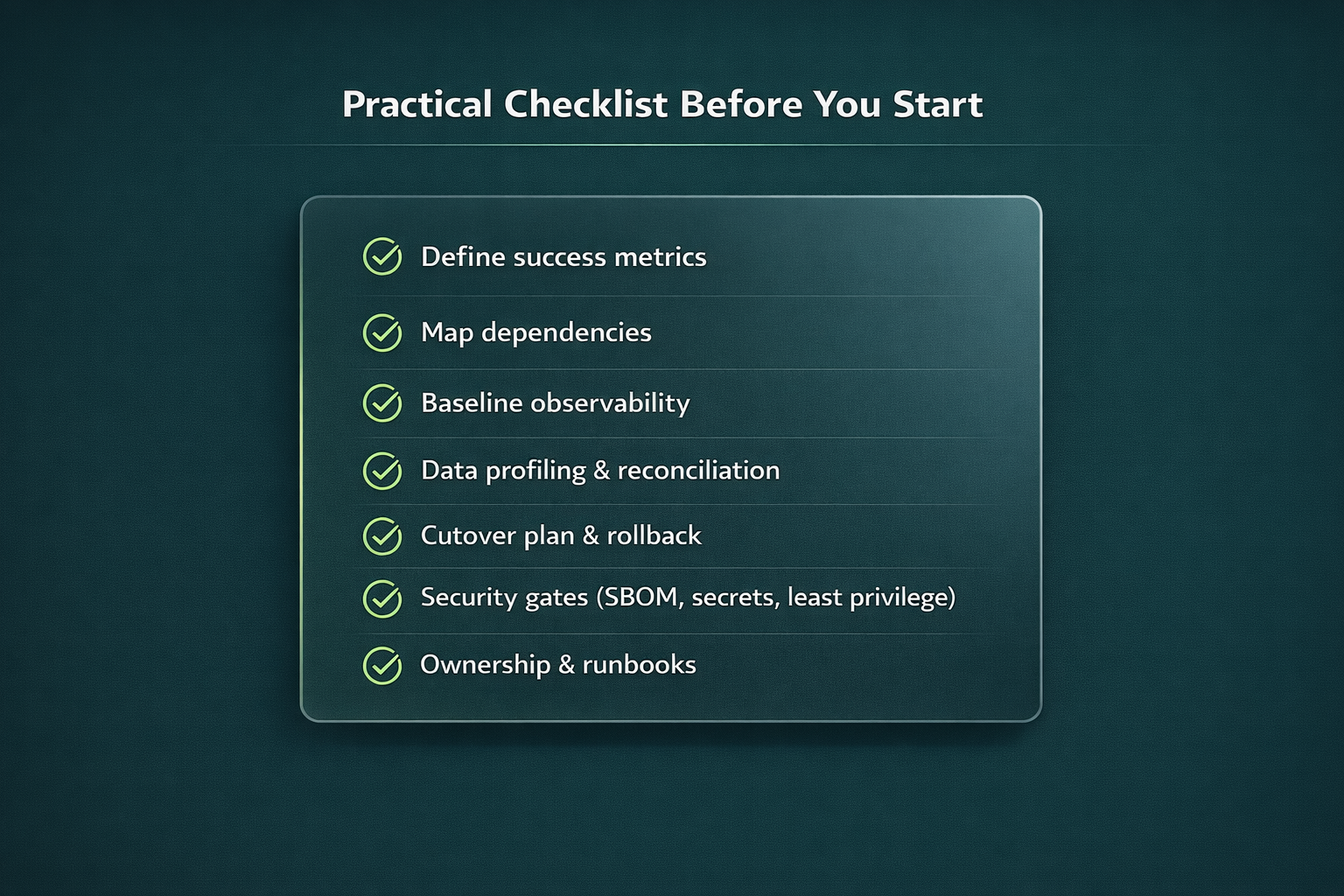
Use this to de-risk the most common legacy app modernization challenges:
- Define success metrics: release frequency, incident rate, latency, cost, compliance posture.
- Map dependencies: systems, jobs, integrations, data consumers, vendor contracts, SLAs.
- Baseline observability: logs/metrics/traces, dashboards, alerting, error budgets.
- Data plan: profiling, canonical entities, reconciliation rules, rollback strategy.
- Cutover plan: staged rollout method (blue/green, canary), rehearsal schedule, runbooks, on-call coverage.
- Security gates: access model, encryption, dependency scanning, secrets management, audit logging.
- Ownership model: who approves changes, who owns incidents, who owns data quality.
When to bring in a modernization partner
Bring in a partner when the risk profile is high: hidden dependencies everywhere, strict uptime requirements, complex compliance, limited internal capacity, or when disadvantages of legacy systems are already impacting customer experience and security posture. A good partner accelerates discovery, builds a realistic risk map, and helps deliver incrementally without gambling on a single cutover night.
If you’re considering outside help, look for teams that start with dependency mapping, data risk controls, and cutover rehearsals — not just a rewrite plan. You can also review CodeGeeks Solutions on Clutch to see project outcomes and client feedback.
Final Thoughts
The hardest part of legacy modernization isn’t the new stack — it’s reducing unknowns. When you surface hidden dependencies, turn tribal knowledge into tests, treat data migration like a product, and rehearse cutover like an incident response drill, modernization stops being a gamble. It becomes a controlled program with measurable risk burn-down.
Legacy systems often impact far more than IT maintenance costs. They affect scalability, integration flexibility, customer experience, compliance posture, and the organization’s ability to innovate quickly.
That’s why many organizations approach modernization as part of broader AI transformation for enterprises initiatives. Instead of isolated code upgrades, transformation aligns architecture, automation, data strategy, and governance with measurable business objectives — turning modernization into a strategic advantage rather than a reactive fix.
FAQ
Which modernization path fits our system?
Pick the path based on urgency and risk tolerance. If you need speed, go with rehost. If you want operational improvements without a full rewrite, replatform. For long-term change and technical debt reduction, refactor/rebuild. If there’s a product that genuinely matches your needs, replace can be the most pragmatic option. And if dependencies and data are complex, incremental approaches are usually safer.
How do we modernize with minimal downtime?
Plan for minimal downtime from day one: blue-green or canary deployments, feature flags, rehearsed cutover runbooks, and a rollback plan you’ve actually tested (not just “documented”). Blue-green is built exactly for this — it reduces downtime and gives you a quick escape hatch if something goes sideways.
How do we find hidden dependencies fast?
Combine runtime traffic analysis, logs/traces, code scanning, and interviews with ops/business owners. Then validate findings against real production behavior.
How do we de-risk data migration?
Start with data profiling so you know what you’re really moving (duplicates, gaps, weird edge cases). Define canonical entities, set up reconciliation checks, and migrate in stages — CDC, dual-read, and dual-write where possible. The key mindset: treat migration as a product with acceptance criteria, not a one-off task.
What security checks are non-negotiable?
At minimum: dependency scanning/SBOM, secrets management, least privilege, and audit logging — plus a clear plan for outdated components. OWASP keeps pointing to vulnerable/outdated components as a major risk source, especially when patching is limited, so you want that risk surfaced early, not discovered after go-live.