

TL;DR
- The biggest risk isn’t “messy code” — it’s silent behavior change, so baseline current behavior first.
- Start with inventory + dependency mapping: AI delivers the fastest wins here.
- If you have little or no tests, build a golden master / characterization baseline before refactoring.
- Refactor in small, reviewable batches (one PR = one intent) and enforce CI regression gates.
- Keep security as a separate control loop: SAST, dependency scans, secrets scanning — not “looks fine.”
- Release with canary/shadow rollouts + a real rollback plan, not big-bang cutovers.
- Track progress with KPIs: change failure rate, MTTR, lead time, critical-path test coverage.
- Common failure mode: treating GenAI as autopilot instead of a tool inside a disciplined process.
Intro
Legacy modernization hurts because the risk is real: behavior is undocumented, tests are missing, and critical knowledge lives in a few people’s heads. That’s why many teams keep “living with it” — nobody wants to be the person who breaks production.
But legacy code modernization using AI is now practical when you use it for the right jobs: discovery, dependency mapping, test generation (with review), incremental refactors, and measurable quality gates. BCG explains how GenAI is rewriting legacy tech modernization rules, especially by accelerating discovery and increasing transparency — exactly what teams need before touching fragile legacy systems.
In other words, AI for legacy code modernization works when you treat AI like an accelerator inside a controlled engineering workflow — not like a rewrite button. This guide shows the approaches, a decision matrix, a safe 9-step workflow with gates, tool categories that matter, common failure modes, and KPIs.
What “AI-assisted legacy code modernization” really means
AI-assisted legacy code modernization does not mean “press a button and get a new system.” It means AI helps you:
- understand the codebase faster (repo-level summarization, module mapping, integration hints),
- baseline behavior before change (golden master / characterization tests),
- generate or expand tests (AI-assisted, human-reviewed),
- execute mechanical refactors and upgrades in small steps,
- enforce quality through CI, policies, and security gates.
Engineers discussing legacy code modernization using AI often focus on a grounded goal: reduce uncertainty by extracting behavior and business rules before refactoring. A useful practitioner perspective is captured in the LLMDevs article.
Common modernization paths (and where GenAI fits)
Refactor-in-place (stabilize, then improve)
Use this when the system must keep running and replacement isn’t feasible. AI can help generate characterization tests, identify duplication, and propose safe refactor steps — but only after you lock behavior.
Strangler pattern (incremental replacement)
Best for monoliths with many integrations. You carve off seams, put stable contracts around slices, and replace gradually. AI for legacy code modernization helps by mapping dependencies, suggesting seam candidates, and drafting interface documentation.
Replatform / re-architect (selected components)
Use this when specific components are blocked by platform constraints (EOL runtimes, scaling limits, operational pain). AI supports assessment, migration notes, and mechanical upgrade help — but architecture decisions remain human work.
Code translation / conversion (with guardrails)
Useful for framework upgrades or language transitions where changes are mechanical. This is where legacy code modernizations using GenAI can look impressive — and still be risky if you skip tests and controlled releases.
Decision Matrix: Choosing the right approach
Use this matrix to avoid the #1 mistake: picking a modernization path that doesn’t match your system’s symptoms.
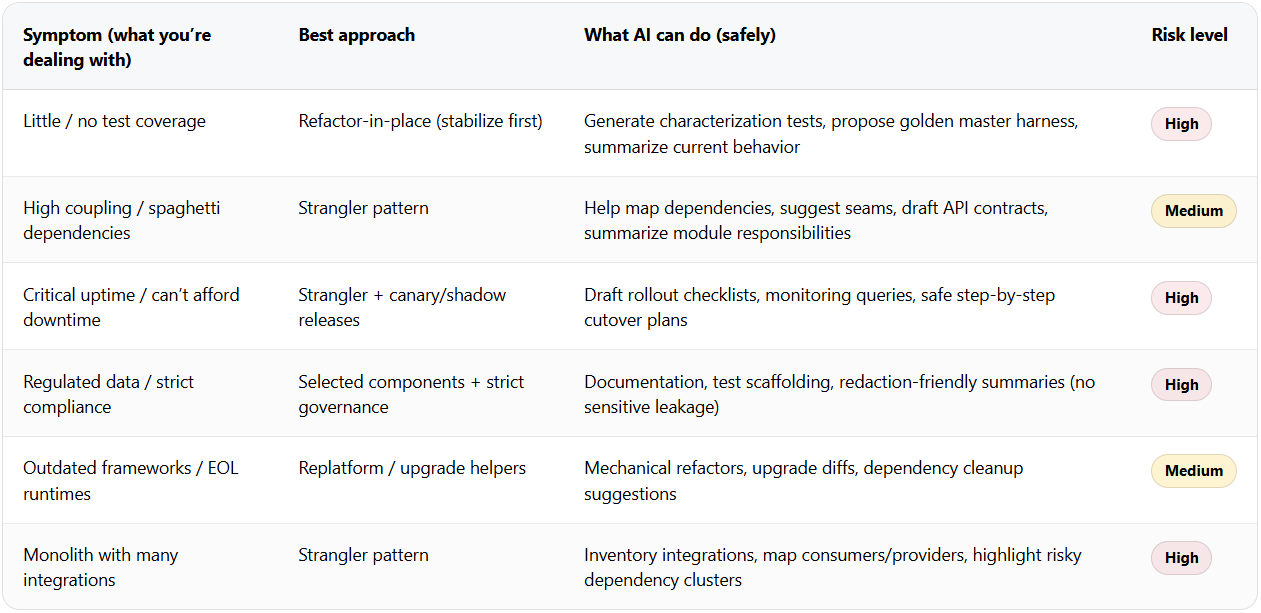
If you’re unsure, default to the approach that reduces uncertainty first (inventory + baseline), not the one that promises the biggest rewrite. That’s the safest way to scale legacy code modernization using AI.
Safe AI workflow: 9 steps with quality gates
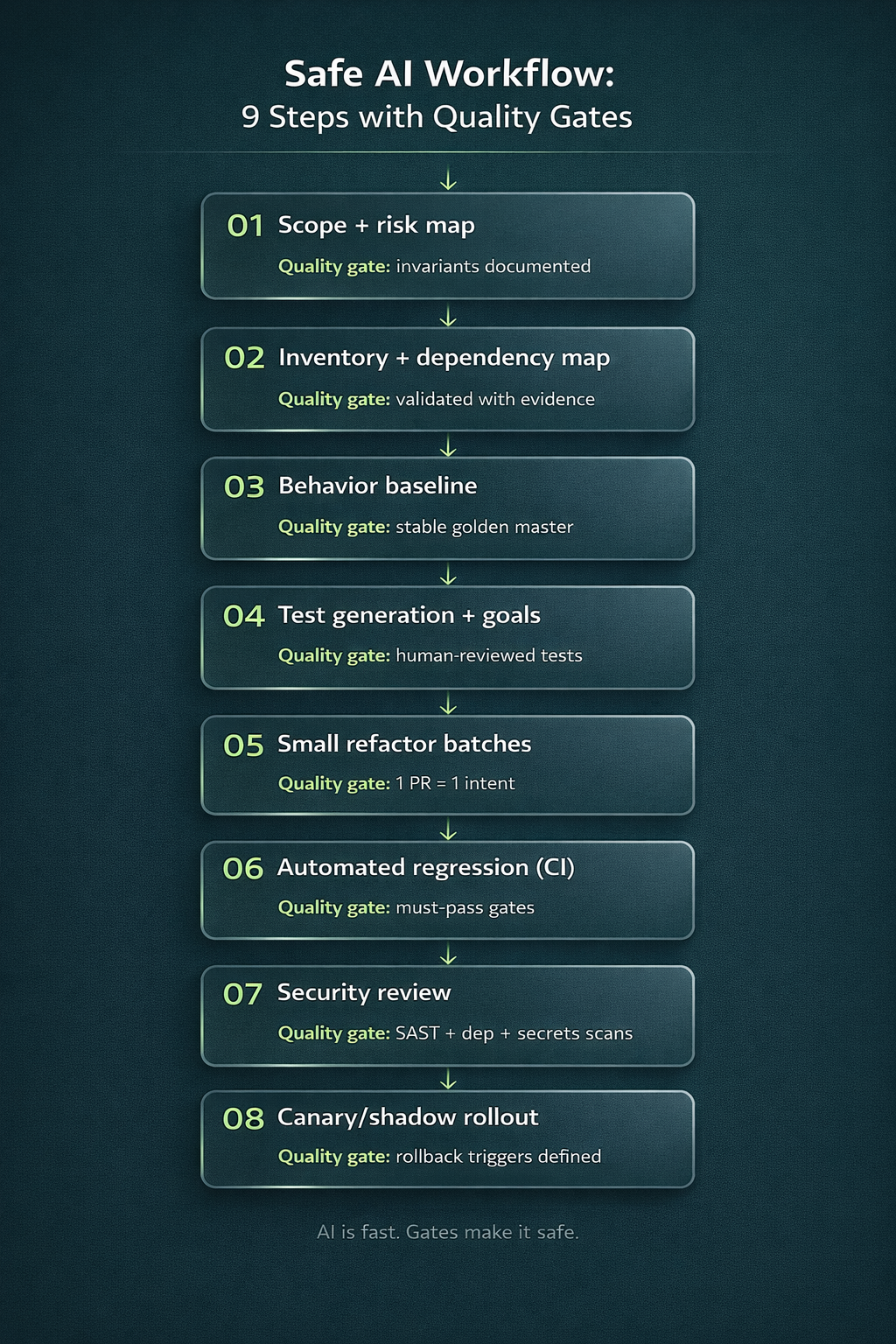
1) Scope + risk map (what must not change)
Define the “do-not-break” list: key outputs, public interfaces, regulatory constraints, performance budgets, and the business flows that keep the lights on.
Quality gate: invariants are written down before any AI-generated code lands.
2) Inventory + dependency map (AI-assisted)
Use AI to summarize modules, identify integration points, and propose a dependency graph — then validate it with real signals (logs, traffic, runtime traces, deployment configs).
Quality gate: important dependencies are confirmed by evidence, not only AI guesses.
3) Behavior baseline (golden master / characterization tests)
Create a baseline that captures current behavior on representative inputs (even if behavior is weird). This prevents “silent improvement” that breaks users.
Quality gate: baseline tests are stable, reproducible, and run in CI.
4) Test generation + coverage goals (AI-assisted, human-reviewed)
Let AI propose tests, edge cases, and fixtures — but treat tests like production code: review them, name them clearly, and ensure they assert the right invariants.
Quality gate: critical flows have coverage you trust (not just a coverage %), and tests fail on behavior drift.
5) Small refactor batches (PR size rules)
Break work into PRs reviewers can fully understand. AI encourages big diffs — your process should force small ones.
Quality gate: one PR = one intent; reviewers can explain the change without a long meeting.
6) Automated regression (CI gates)
Wire CI so refactors can’t merge unless baseline + unit/integration checks pass. AI speed is useless if regression is manual.
Quality gate: CI blocks merges on regressions (no “temporary bypass” culture).
7) Security review (separate from AI review)
Run SAST, dependency scanning/SBOM, and secrets scanning regardless of how “clean” the diff looks. Human review and AI review do not replace security tooling.
Quality gate: security checks are mandatory, repeatable, and produce actionable output.
8) Canary/shadow rollout
Deploy changes to a small slice or a parallel “shadow” path, compare results, and only then ramp up.
Quality gate: explicit rollout metrics + rollback triggers exist (not “we’ll watch it”).
9) Post-release monitoring + rollback plan
Monitor error rates, latency, and business signals. If something drifts, roll back fast and learn.
Quality gate: rollback is rehearsed, quick, and owned (names, not teams).
AI makes modernization faster — the gates are what make it safe. This is where ai for legacy code modernization delivers value without turning production into your test environment.
AI tools for legacy code modernization: categories that matter
When teams ask for AI tools for legacy code modernization, category-level thinking is more useful than brand lists:
- Code assistants (IDE): safe local refactors, small transformations
- Repo-level code search & summarization: faster discovery and navigation
- Test generation tools: scaffolding + edge case proposals (human-reviewed)
- Static analysis + security scanning: SAST, secrets scanning, policy checks
- Dependency and SBOM tools: supply-chain visibility and upgrade planning
- CI quality gates: lint, test gates, policy enforcement
- Observability tools: validate “behavior didn’t change” using production signals
- Migration helpers: framework upgrades, deprecations removal
- Optional agent workflows: orchestrate tasks — but keep approvals explicit
While tools like static analyzers, LLM-based refactoring assistants, and code-mapping platforms accelerate modernization, tooling alone is not a strategy. Successful legacy upgrades require alignment between architecture, data flows, security policies, and business priorities.
That’s why many organizations complement tooling with broader AI transformation services — ensuring modernization efforts are embedded within a larger operational and technology roadmap rather than treated as isolated code updates.
Even government modernization efforts are leaning on AI to handle legacy complexity — but with strict verification and governance. GitLab’s breakdown of how AI can fix government’s legacy code problem offers a useful real-world framing.
If you’re planning legacy code modernization using AI, the fastest safe start is a short “risk-first setup”: map dependencies, lock behavior, add CI/security gates, and modernize in slices.
If you want help setting up this workflow without slowing delivery, explore CodeGeeks Solutions and check independent feedback on Clutch reviews.
Final Thoughts
Legacy code modernization using AI isn’t about replacing engineering judgment. It’s about reducing uncertainty: making dependencies visible, locking behavior, accelerating test scaffolding, and executing refactors incrementally with strong quality gates. Do that, and you modernize faster — without gambling with production.
After outlining the risks — hidden dependencies, incomplete refactoring, AI hallucinated logic, and architectural drift — it’s important to recognize that modernization requires more than tooling.
For organizations that want a structured and low-risk approach, working with experienced teams offering AI-driven legacy modernization services can significantly reduce failure rates. Instead of relying purely on automated refactoring, this approach combines AI-assisted code analysis with architectural review, governance, testing strategy, and phased migration planning — ensuring modernization improves maintainability rather than introducing new technical debt.
FAQ
When is AI a bad idea for legacy code modernization?
When you can’t validate behavior (no tests and no ability to build a baseline), when changes touch high-risk domains (auth/crypto/payments), or when compliance rules prohibit sharing code context without a governed setup.
How do we modernize safely if we have little or no test coverage?
Start with golden master/characterization tests around critical flows, not broad coverage targets. Baseline behavior first, then modernize in small slices.
What’s the best way to validate that behavior hasn’t changed after AI refactoring?
Characterization tests + CI regression gates + production validation (shadow/canary) and monitoring of key business/technical metrics.
Which AI tools for legacy code modernization deliver the fastest wins?
Repo-level summarization/search and dependency mapping typically deliver the fastest early wins, followed by AI-assisted test scaffolding — as long as humans review outputs.
How do we handle security and compliance when using GenAI on source code?
Use strict governance: avoid secrets/PII in prompts, prefer controlled environments where required, and run independent security checks (SAST, dependency scans, secrets scanning) on every change.