

TL;DR
- A modern retail chatbot is a revenue + support tool, not a “FAQ widget.”
- The fastest ROI usually comes from post-purchase flows (order tracking, returns, delivery updates).
- Pre-purchase assistance is where chatbots in retail can lift conversion—if answers are grounded in real catalog and inventory data.
- The #1 conversion killer is confident misinformation (pricing, availability, promo rules).
- Don’t automate sensitive edge cases: payment disputes, fraud, escalations with strong emotion—use human handoff.
- Measure impact with KPIs leadership understands: deflection, containment, conversion, AOV, cost per resolution, and accuracy on high-risk intents.
- A good chatbot for retail has guardrails, auditability, and a clear escalation path.
Intro
Chatbots for retail industry have become a must-have because retail customers now expect speed, personalization, and 24/7 availability—especially on mobile, during peak seasons, and when they’re stuck mid-checkout. Retailers also need to scale support without scaling headcount at the same pace, and that’s exactly where well-designed chatbots for retail can help.
Shopify frames this shift clearly: chatbots are no longer just for support—done well, they help customers discover products, get quick answers, and keep momentum toward purchase.
In this article you’ll get: practical chatbot use cases in retail, real-world retail chatbot examples, KPIs and ROI metrics, and a straightforward implementation checklist so your retail chatbot improves conversion and reduces support load—without turning into a “rage bot.”
What is a retail AI chatbot (and how it differs from a basic FAQ bot)
A basic FAQ bot is usually a scripted decision tree: it matches a keyword and responds with a canned answer. A retail AI chatbot is different because it can:
- understand intent in natural language (not just keyword matching),
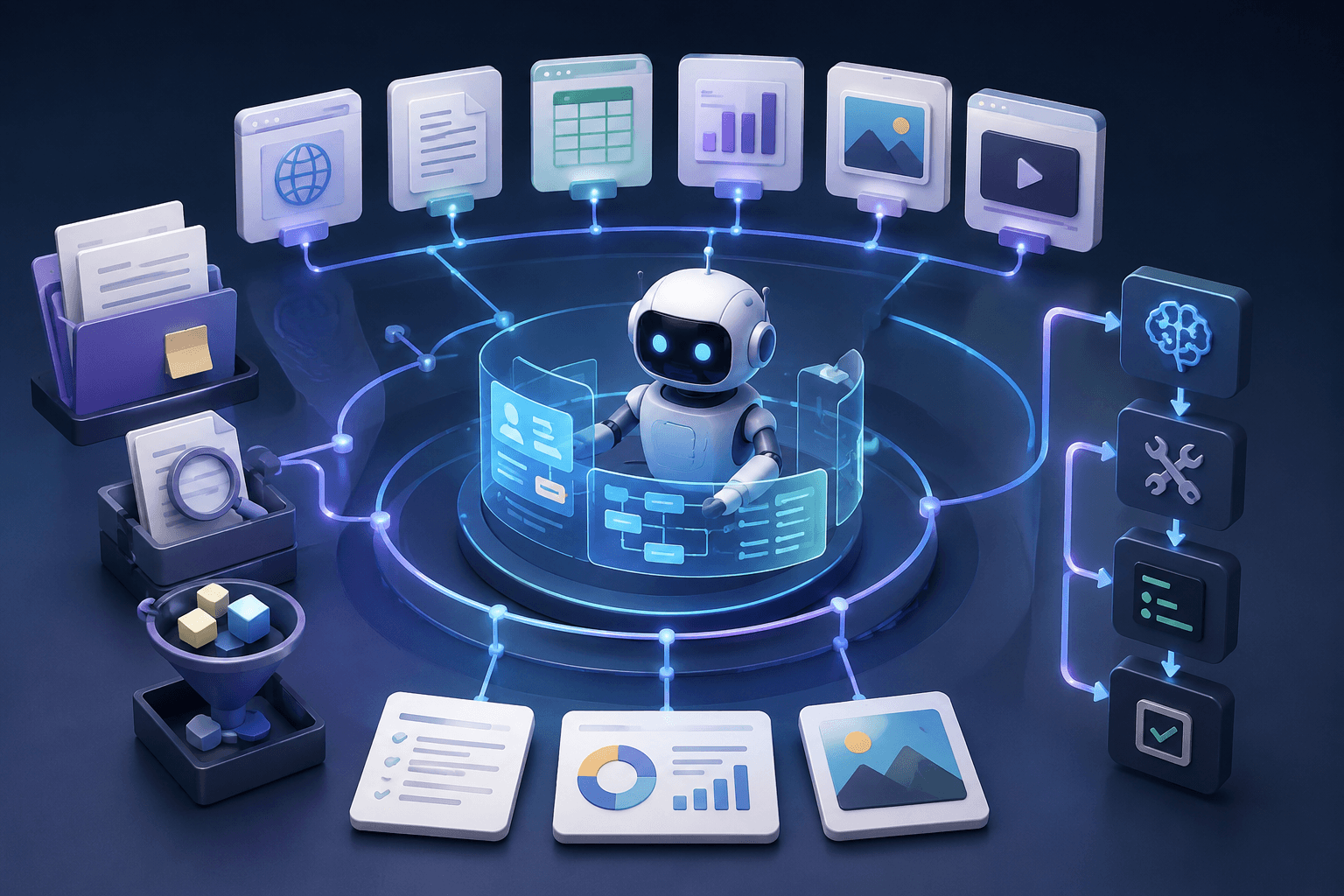
- retrieve answers from approved sources (catalog, policies, order systems),
- take actions through integrations (start a return, pull order status, check stock),
- know when to ask clarifying questions,
- hand off to a human when confidence is low or the case is high risk.
This is why retail AI chatbots are less about “chat” and more about “grounded assistance.” Google’s overview of AI chatbot use cases emphasizes that these systems work best when grounded in enterprise data and workflows rather than improvising answers.
Chatbot use cases in retail by the customer journey
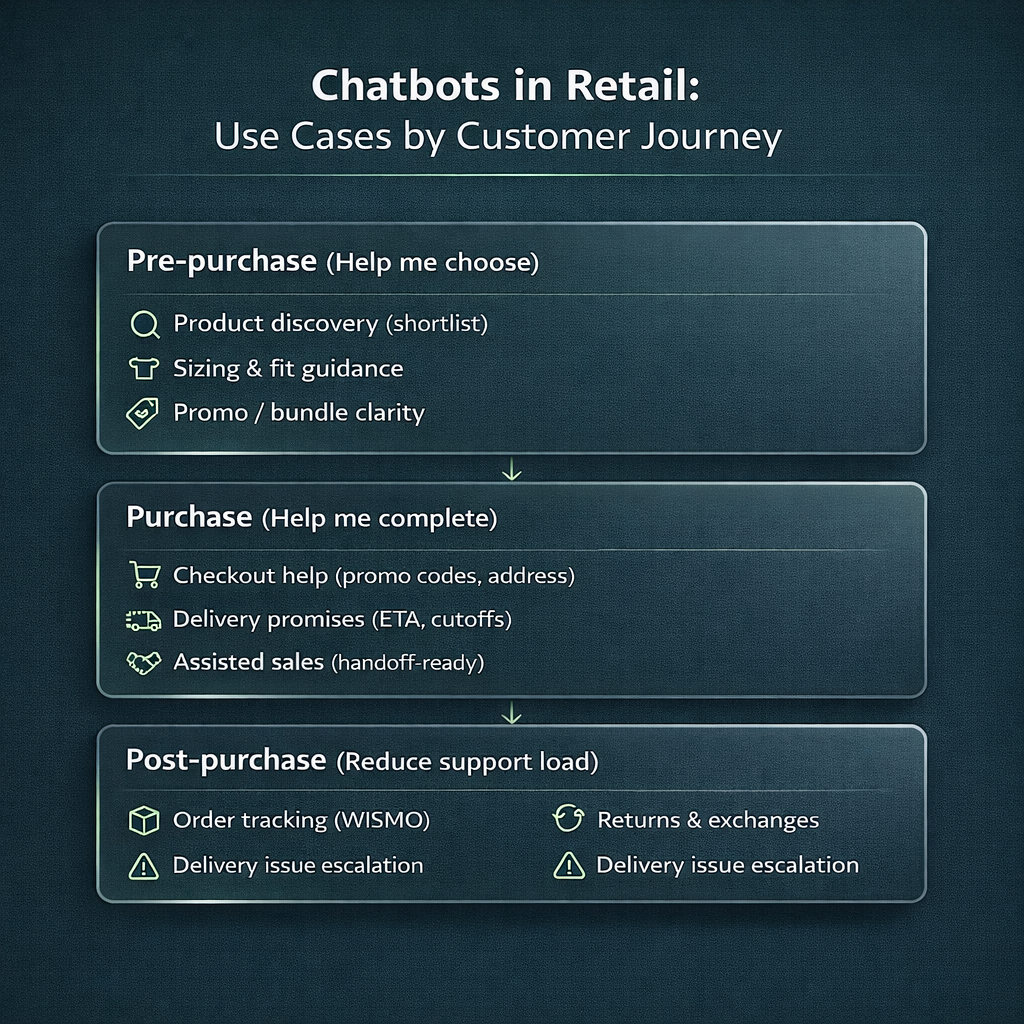
Pre-purchase: “Help me choose”
This is the stage where chatbots in retail can affect conversion most—because the shopper is undecided. Strong use cases include:
- Product discovery: “I need a gift under $80 for someone who loves espresso.”
- Sizing and fit help: “Is this true-to-size? I’m between M and L.”
- Compatibility checks: “Will this case fit iPhone 15 Pro Max?”
- Policy reassurance: “Can I return if it doesn’t fit?”
- Promo guidance: “What items qualify for the bundle?”
A practical rule: keep it conversational but constrained. Ask 1–3 clarifying questions, then present a short list of options (not a long paragraph).
If you do this right, a retail chatbot becomes a “confidence builder” that nudges the shopper toward purchase instead of leaving them to bounce back and forth between filters.
Purchase: “Help me complete”
This is about preventing abandonment and reducing friction:
- Shipping and delivery promises: deadlines, delivery windows, pickup options
- Checkout troubleshooting: payment method questions, promo code issues, address validation
- Cart support: “Can you hold my cart?”, “Can I split payment?”
- Assisted sales: if you sell high-ticket items, the bot can qualify a lead and route to a human fast
Zendesk positions AI messaging as a way to engage customers in real time for sales and support—especially valuable at the exact “I’m about to buy” moment.
This is also where a chatbot for retail can backfire if it’s slow, vague, or doesn’t understand variants. In purchase-stage flows, the bot must be crisp and confident—but only when it’s grounded in the truth.
Post-purchase: “Reduce support load”
If you want the quickest operational wins, start here. The reason is simple: volume is high and intents are predictable.
- WISMO: “Where is my order?”
- Returns and exchanges: eligibility, label creation, refund timeline
- Delivery issues: “It says delivered but I didn’t get it” (often requires human handoff)
- Account assistance: basic updates and order history retrieval
Narvar’s overview of the “best retail chatbots” repeatedly highlights post-purchase experiences and proactive tracking/returns as high-impact areas where chatbots reduce support pressure.
If your goal is fast ROI, prioritize post-purchase first, then expand into pre-purchase discovery once you trust your data and guardrails.
Retail automation with AI chatbots: what to automate (and what not to)
Retail automation with AI chatbots works best when you automate repetitive, well-defined tasks—and keep high-risk issues human-first.
Automate (usually safe)
- order tracking, delivery ETAs, shipping status
- return initiation and policy explanations
- store hours, store location, pickup instructions
- product attribute Q&A grounded in catalog data
- appointment booking (if applicable)
Don’t automate by default (or require strict gates)
- chargebacks, payment disputes, fraud
- identity verification problems
- medical or regulated product advice
- complex exceptions (“I need a special refund”, “my parcel was stolen”)
- emotionally loaded situations (lost gift, ruined event)
There’s real academic evidence that “one-size-fits-all” chatbot responses can hurt user experience when expectations are nuanced—especially in fashion retail where intent and uncertainty are high.
So the goal is not “automate everything.” The goal is to automate what the bot can do accurately, quickly, and safely—then hand off the rest smoothly.
For retail organizations ready to move beyond isolated pilots, AI transformation is about more than chatbots — it’s about redesigning operations around data and automation.
AI transformation for retail can unify customer experience, inventory intelligence, demand forecasting, personalization, and back-office automation into a scalable strategy. Instead of layering AI onto outdated workflows, transformation aligns technology, processes, and governance — turning modernization into a long-term competitive advantage rather than a short-term experiment.
Retail chatbot examples (what they actually do)
Rather than listing random brand names, here are the most common retail chatbot examples you’ll see among top-performing programs—and what makes them work.
1) Post-purchase tracking and proactive updates (WISMO done right)
What it actually does: pulls order status, shows delivery ETA, and reduces “Where is my order?” tickets—often with proactive notifications.
Why it’s top: it’s high volume, low ambiguity, and customers genuinely want speed. Narvar’s examples repeatedly emphasize this as a core chatbot win.
+ Pros
- Fast ROI (ticket deflection + better customer experience)
- Easy to measure (containment, deflection, repeat-contact rate)
– Cons
- Needs clean OMS + carrier integrations or it becomes misleading
- Edge cases (lost parcels, “delivered but not received”) must hand off
2) Returns and exchanges in a few messages
What it actually does: checks eligibility, generates label, explains refund timeline, and captures reason codes.
+ Pros
- Huge support load reduction
- Captures structured feedback (reasons, quality issues, sizing pain)
– Cons
- Policy exceptions need human escalation
- If the bot misstates eligibility, it destroys trust fast
3) Product discovery and “help me choose” flows
What it actually does: asks a few questions (budget, use-case, constraints), then suggests a shortlist and links to PDPs. Shopify points out that retail chatbots increasingly support discovery and guidance, not just support.
+ Pros
- Direct conversion impact
- Helps customers who don’t know what search terms to use
– Cons
- Needs high-quality product attributes and taxonomy
- Can feel generic if personalization is weak
4) Store associate / internal retail assistant bots
What it actually does: helps staff quickly check inventory, product info, or standard procedures—reducing back-and-forth and training time. Microsoft marketplace retail chatbot listings illustrate this “operational assistant” angle.
+ Pros
- Often easier than customer-facing bots (controlled users, clear tasks)
- Improves in-store experience indirectly
– Cons
- Still depends on data freshness
- Needs careful permissioning (who can see what)
5) Sales-messaging bots that qualify and route
What it actually does: answers quick questions, qualifies intent, and hands off to sales or support with full context. Zendesk showcases this style for sales conversations and messaging-first experiences.
+ Pros
- Keeps momentum during checkout doubts
- Makes handoff efficient (agent gets context instantly)
– Cons
- If the bot stalls or loops, it increases abandonment
- Needs strong escalation rules and fast agent availability
Why it’s usually better to build your own retail chatbot
Off-the-shelf bots can be a quick start, but if you care about conversion and brand trust, a custom retail chatbot is usually higher quality because retail is “data + edge cases”:
- Your catalog isn’t generic. Variants, bundles, sizing rules, compatibility notes, and promo logic are unique—and generic bots struggle with that.
- Accuracy matters more than fluency. Wrong pricing/availability kills trust. Your bot must be grounded in live data and allowed sources.
- Integrations decide ROI. Real value comes from connecting catalog + inventory + OMS + returns + shipping + customer profile.
- Brand voice and escalation rules are part of UX. Many bots fail not because they “can’t chat,” but because they don’t know when to stop and hand off (and how to do it smoothly).
Bottom line: if you want a chatbot that actually improves conversion (not just answers FAQs), it’s usually smarter to build a bot tailored to your data, workflows, and guardrails—then iterate using real conversation analytics.
How to build a retail chatbot that doesn’t hurt conversion
Data sources the bot must be grounded in
A production-grade chatbot for retail should be grounded in:
- Product catalog (attributes, variants, sizing)
- Inventory (online + store stock where relevant)
- OMS (order status, tracking, returns eligibility)
- Shipping rules and cutoffs
- Pricing and promo rules
- Policies (returns, warranties)
This is where retail AI chatbots differ from FAQ bots: they should retrieve truth from systems, not “guess.”
Guardrails
Minimum guardrails for chatbots for retail:
- confidence thresholds + safe fallback answers
- “never guess pricing/availability” rule (always fetch or ask clarifying questions)
- explicit exclusions for promotions and policy edge cases
- confirm-before-action patterns (returns, cancellations, address changes)
- logging and auditing: what the bot answered and what sources it used
Human handoff
Handoff should trigger when:
- the user repeats or sentiment turns negative
- payment/fraud/identity risk appears
- the bot can’t resolve the issue within 2–3 turns
- the case is an exception (delivery disputes, special refunds)
The handoff should preserve context: summary + order/cart details + what was already tried.
KPIs and ROI: how to measure performance
To prove value, measure three layers:
Revenue metrics
- assisted conversion rate (bot sessions vs non-bot sessions)
- add-to-cart rate, checkout completion
- AOV change on bot-assisted sessions (control for promos)
Support efficiency metrics
- deflection rate
- containment rate (resolved without an agent)
- cost per resolution
- agent handle time reduction (when the bot collects details first)
Quality and safety metrics
- CSAT (useful, but not enough)
- FCR (first-contact resolution)
- accuracy on high-risk intents (pricing/availability/promos) via audits
- escalation reason distribution (what the bot still can’t handle)
Implementation checklist
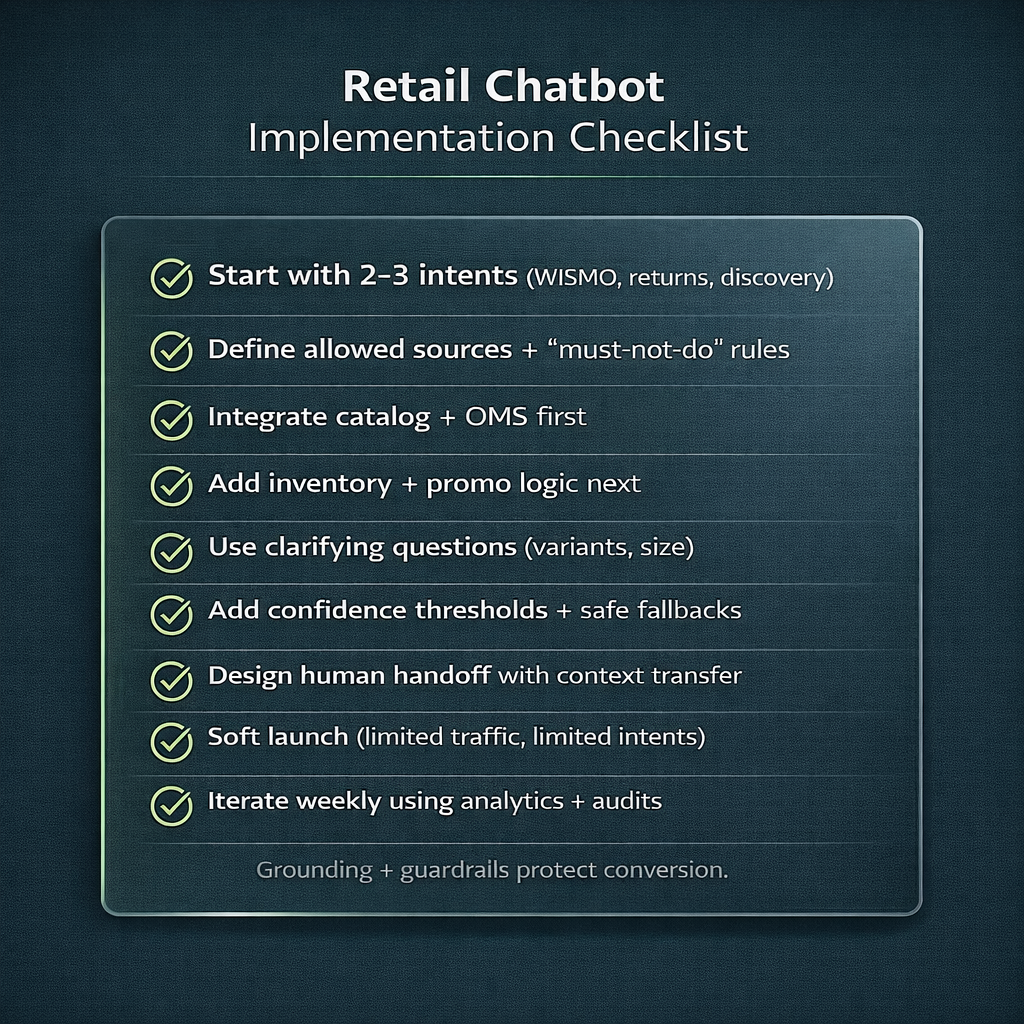
- Start with 2–3 high-volume intents: WISMO + returns + basic product discovery
- Define “allowed sources” and “must-not-do” rules (pricing guesses, promo promises)
- Integrate catalog + OMS first; then inventory and promo engines
- Design flows that ask short clarifying questions and show shortlists
- Add confidence thresholds + safe fallbacks
- Build human handoff with context transfer
- Set up monitoring: answer audits, escalation reasons, failure buckets
- Soft launch: limited traffic, limited intents
- Weekly iteration: expand only when accuracy is stable
This is the safest path to scaling retail automation with AI chatbots without harming conversion.
If you don’t have in-house AI engineering capacity, working with an experienced AI automation partner can accelerate safe chatbot deployment.
AI Automation services for businesses typically cover use case definition, architecture design, LLM selection, integration with CRM/helpdesk systems, guardrails (rate limits, approval flows, escalation logic), and ongoing monitoring. This ensures your chatbot is not just functional — but secure, observable, and aligned with measurable business KPIs.
If you want a retail chatbot that improves conversion and reduces support load, the difference is rarely “the model.” It’s grounding, guardrails, and integrations—plus a handoff that feels effortless.
Learn more about CodeGeeks Solutions and check independent client feedback on Clutch.
Final Thoughts
The best chatbot use cases in retail aren’t the flashy ones. They remove friction at the exact moment the customer needs help: choosing, completing checkout, and self-serving after purchase. Build the bot on verified data, keep strict boundaries around pricing and availability, and treat human handoff as part of the product—not a fallback. Do that, and chatbots in retail become a measurable growth and efficiency lever.
FAQ
What retail chatbot use cases deliver the fastest ROI?
Post-purchase flows (tracking, returns, delivery updates) usually pay back first because they’re high volume and predictable.
How do we prevent a retail chatbot from giving wrong pricing or availability?
Never let it guess. Pull pricing and inventory from live systems, require variant selection, use confidence thresholds, and fall back safely.
Which integrations matter most for chatbots in retail (catalog, inventory, OMS)?
Start with catalog + OMS for quick support ROI, then add inventory and promo logic for conversion impact (Microsoft marketplace retail chatbot listing.
When should a chatbot hand off to a human agent in retail support?
When sentiment is negative, the user is looping, payment/fraud/identity risk appears, or it’s an exception case.
How do you measure success for retail AI chatbots beyond CSAT?
Track containment + deflection, assisted conversion, AOV on bot-assisted sessions, accuracy on high-risk intents, and reduction in agent handle time. Academic research also shows experience can degrade with generic responses—so quality metrics matter.