
TL;DR
- What it is: AI agent orchestration coordinates models, tools and agents so a multi-step task runs in the right order, with shared state, limits and human checkpoints.
- When it is needed: later than most teams think. Start with one model call or one agent, and add orchestration only when a simpler setup fails for a clear reason.
- Five patterns: sequential, concurrent, handoff, group chat (maker-checker) and manager (orchestrator-workers). Each has a typical failure mode.
- Seven components: orchestrator, agents with contracts, tools, shared state, guardrails and approvals, observability, failure handling.
- Choosing a platform: compare state handling, approvals, tracing, identity, model flexibility and running cost. Avoid lock-in by keeping prompts, tools and traces portable.
What is AI agent orchestration?
AI agent orchestration is the coordination layer that decides which model, agent or tool handles each step of a task, in what order, with what information, and under which limits. It keeps state between steps, passes results along, stops runaway loops and brings in a person when an action carries risk. Some vendors call it agentic orchestration; in this guide the terms mean the same thing.
The more useful question is when it is worth the complexity. Microsoft's architecture guidance on agent patterns and Anthropic's Building effective agents both recommend starting with the simplest setup that solves the problem. That advice translates into a four-step rule.
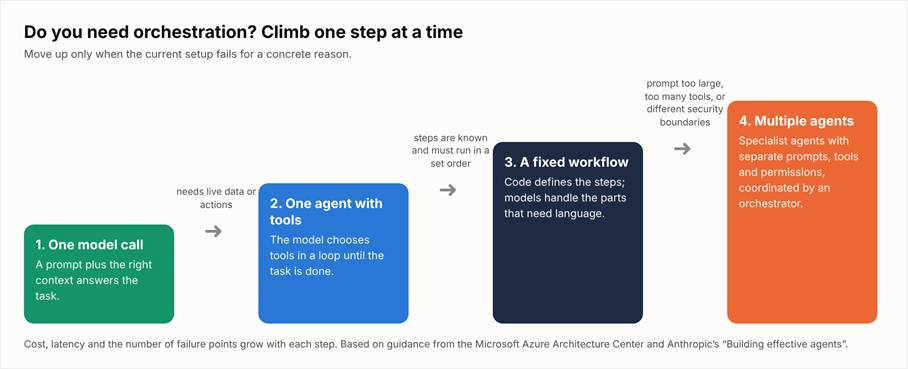
Figure 1. Move to the next step only when the current one fails for a concrete reason: prompt size, too many tools, or different security boundaries.
A single model call with good context handles more than people expect. One agent with a few tools covers many support and research tasks. A fixed workflow, where code defines the steps, suits processes with a known order, such as document intake or invoice checks. Multiple coordinated agents are justified when one prompt can no longer hold all instructions, when a single agent has too many tools to choose from reliably, or when parts of the task need different permissions.
CodeGeeks Solutions applies this rule when scoping AI projects: the first design is usually the smallest one that can pass a real test, and extra agents are added only when that design hits a measurable limit.
AI agent orchestration patterns
Most production setups use one of five patterns or a combination of them. The names below follow Microsoft's catalog, with Anthropic's equivalents where they differ.
Table 1. Five orchestration patterns
| Pattern | How it works | Use it when | Main risk |
|---|---|---|---|
| Sequential (prompt chaining) | Agents run in a fixed order; each output feeds the next step | Steps are known and depend on each other, such as extract, check, summarize | One weak step corrupts everything after it |
| Concurrent (parallelization) | Several agents work on the same input at once; results are merged | Independent views are needed fast, such as risk, legal and finance reviews | Conflicting outputs and higher token cost |
| Handoff (routing) | One agent passes the whole task to a better-suited specialist | The right expert is unknown until the request is read | Endless passing back and forth |
| Group chat (maker-checker) | Agents discuss in a shared thread; one drafts, another reviews | Quality needs a second opinion before release | Long conversations that never converge |
| Manager (orchestrator-workers, magentic) | A lead agent builds a plan, assigns subtasks and tracks progress | The task is open-ended and the steps are not known in advance | Hardest to predict, test and price |
Control models are a separate choice. IBM describes centralized orchestration (one coordinator decides), decentralized (agents negotiate among themselves) and hierarchical (coordinators manage groups of agents). Most business systems use a centralized or hierarchical model, because it is easier to audit.
Multi-agent orchestration is not free. Every extra agent adds model calls, latency and new ways to fail: agents misread each other's output, repeat work, or loop. Microsoft's guidance warns against multi-agent designs when a single agent can do the job, and the economics support that caution. Gartner predicts that over 40% of agentic AI projects will be canceled by the end of 2027 because of escalating costs, unclear business value or inadequate risk controls.
AI agent orchestration components
A production setup needs more than agents and prompts. The seven components below appear in nearly every reliable system, whatever framework is used.
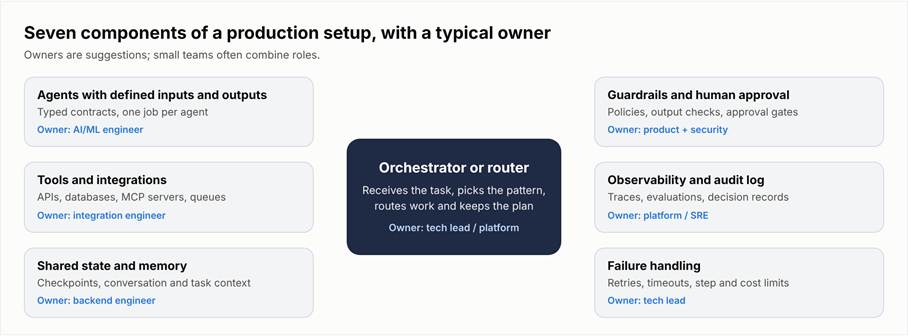
Figure 2. Seven components around the orchestrator, with a typical owner for each.
Table 2. Components, purpose and owner
| Component | What it does | Typical owner |
|---|---|---|
| Orchestrator or router | Receives the task, chooses the pattern and routes work | Tech lead / platform team |
| Agents with defined inputs and outputs | Each agent has one job and a typed contract | AI/ML engineer |
| Tools and integrations | APIs, databases, queues and MCP servers that agents can call | Integration engineer |
| Shared state and memory | Checkpoints and context that survive between steps and restarts | Backend engineer |
| Guardrails and human approval | Policy checks, output validation and approval gates for risky actions | Product owner + security |
| Observability and audit log | Traces of every step, evaluations and a record of decisions | Platform / SRE |
| Failure handling | Retries, timeouts, step limits and cost limits | Tech lead |
Two components deserve extra attention. Shared state decides whether a workflow can resume after a crash or a long approval wait; the CodeGeeks article on agentic context engineering covers how agents share and limit context. Observability decides whether anyone can explain a wrong result later; OpenTelemetry now defines standard spans for agents, model calls and tool calls, which keeps traces portable between tools.
In client projects, CodeGeeks Solutions spends much of the design effort on the edges of this diagram: the integrations with existing systems and the guardrails around them. Those are where agents touch real data and real money.
AI agent orchestration workflow: an example
Consider a support operation that handles refund and account requests. The workflow in Figure 3 uses a centralized orchestrator and one specialist agent per request type.
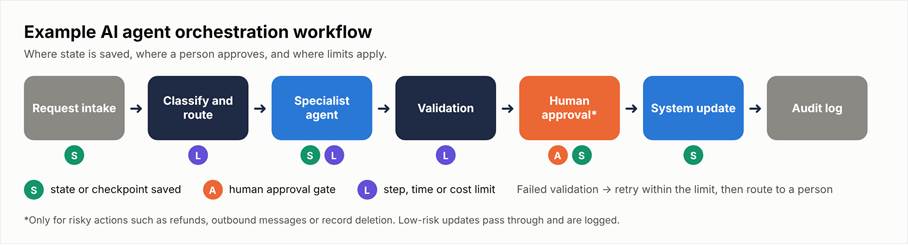
Figure 3. An example workflow. S = state saved, A = human approval, L = step, time or cost limit.
- 1. Request intake. A ticket arrives from email or chat. The system saves it with an ID before any model sees it, so nothing is lost if a later step fails.
- 2. Classify and route. A small, fast model labels the request and picks the specialist. A limit caps how many times a request can be re-routed.
- 3. Specialist agent. The refund agent reads the order history through a read-only tool and drafts a decision. It has a step limit and a token budget.
- 4. Validation. Code checks the draft against policy: amount, order age, previous refunds. A failed check returns the task to the agent once, then sends it to a person.
- 5. Human approval. Refunds above a set amount wait for a team lead. The state is saved, so the workflow can pause for hours without holding resources.
- 6. System update. Only after approval does a write-enabled tool issue the refund.
- 7. Audit log. Every step, input, decision and approver is recorded.
The design choice that matters most is visible in steps 3 and 6: the agent that reasons about the refund cannot issue it. Write access sits behind validation and approval.
AI agent orchestration framework and platform: how to choose
Teams usually pick from four options. An open-source framework (for example, LangGraph, CrewAI or Microsoft Agent Framework) gives the most control. A cloud or vendor ai agent orchestration platform (for example, the agent services from AWS, Microsoft Azure and Google Cloud) covers hosting, identity and monitoring. Workflow and low-code tools suit simple, mostly deterministic flows. A custom build makes sense when requirements are unusual or volume is high. The table compares them on criteria rather than brands.
Table 3. Platform choice by criteria (general tendencies; check each product)
| Criterion | Open-source framework | Cloud / vendor platform | Workflow / low-code tool | Custom build |
|---|---|---|---|---|
| State and checkpoints | Usually built in; storage is the team's job | Managed | Basic; long pauses can be hard | Designed to fit |
| Human approval steps | Supported; UI must be built | Often built in | Often built in | Designed to fit |
| Tracing and observability | Via OpenTelemetry or add-ons | Built in, sometimes vendor-specific | Limited for model internals | Designed to fit |
| Identity and permissions | Integrates with the team's IAM | Tied to the cloud's IAM | Connector-level | Designed to fit |
| Model flexibility | High | Often favors the vendor's models | Depends on connectors | High |
| Running cost | Infrastructure + engineering time | Usage-based fees | Per task or per seat | Highest upfront, lowest per task at scale |
Build versus buy follows the same logic as other platform decisions. Buy when speed matters and the workflow fits what a product already does; build when the workflow is core to the business, data cannot leave a controlled environment, or per-task fees would grow faster than the value. Whichever route is chosen, keep prompts, tool definitions and traces in formats the team controls, so a move to another framework later costs weeks, not a rewrite.
Which of your workflows needs one agent, a fixed workflow or several agents?
CodeGeeks Solutions can review a shortlist of candidate workflows and recommend the simplest setup for each, with the components it would need and where approvals belong. Request a workflow review from the AI transformation team.
AI agent orchestration best practices
- Give every agent one role and a clear handoff. Write prompts and contracts that state what each agent receives, what it returns and who gets the result.
- Start with one agent. Add a second only when a test shows the first cannot handle the load, the context or the permissions.
- Grant least-privilege access. Read-only by default; write access only where a step needs it, through a separate tool.
- Require human approval for risky actions. Payments, deletions, external messages and changes to customer records should wait for a person until the data proves otherwise.
- Log and evaluate from day one. AI agent orchestration without traces cannot be debugged. Track task completion rate, error rate, human intervention rate and cost per task.
- Set step, time and cost limits. Every loop needs a ceiling and a defined action when it is reached.
How CodeGeeks Solutions builds multi-step AI workflows
The examples below come from published CodeGeeks work and show what AI agent orchestration looks like in practice at a smaller scale. None of them is presented as an orchestration layer; each shows how AI steps sit inside a larger workflow with triggers, data pipelines and people.
Inspection Management Platform
Situation: an inspection business needed field technicians, administrators and clients to work from one system, with reports available faster and fewer data errors. AI steps and workflow: CodeGeeks built a role-based platform in which an AI agent works inside the daily inspection workflow, triggered by events in the process and connected to the surrounding systems. Result (per the case study): 60% faster access to reports, 2.5x faster onboarding and a 42% boost in data accuracy.
Lead and Data Intelligence System
Situation: a marketing data business needed to search and load a very large dataset far faster than its existing process allowed. AI steps and workflow: LLM steps were placed inside a data pipeline that uses queues and background functions, so heavy processing runs asynchronously and the user-facing search stays fast. Result (per the case study): data search reduced from three hours to 20 minutes, uploads 50x faster, and more than 184 million records handled.
AI-driven marketing and social media automation
Situation: a team producing social content wanted to cut repetitive manual work. AI steps and workflow: a chain of steps covering content generation, scheduling, best-time-to-post prediction and analytics, with a learning loop that feeds results back into the next cycle. Result (per the AI automation services page): 60% less manual work.
Across all three, the pattern is the same: AI handles the steps that need language or prediction, while ordinary code, queues and access rules handle the rest.
“Our default is the smallest design that passes a test on real cases. A second agent is added only when the logs show a specific limit: the prompt has grown too large, the tool list is too long for reliable choices, or one step needs permissions that another step must never have. In most projects, a fixed workflow with one agent inside it does the job.”
— CodeGeeks Solutions AI engineering team
How to start
- 1. Pick one workflow with clear volume, a known owner and a measurable outcome.
- 2. Map the steps and mark which need language, which need data and which need a decision.
- 3. Start with one agent or a fixed workflow, not a team of agents.
- 4. Add approvals and logs before the first real user touches it.
- 5. Measure and extend: compare completion rate, intervention rate and cost per task with the old process, then add the next step or agent.
According to the CodeGeeks AI transformation page, a first production rollout typically takes 8 to 24 weeks, depending on integrations and data readiness.
Ready to put a first agent workflow into production?
CodeGeeks Solutions works as an AI-native product engineering partner: it helps companies automate operations, modernize legacy systems and build AI-enabled products on secure, dependable data foundations. If one workflow is already chosen, the next step is a working version with real data, approvals and monitoring. Discuss a pilot with the AI automation team and get a scoped plan for that workflow.
FAQ
What is AI agent orchestration?
AI agent orchestration is the coordination of models, agents and tools so that a multi-step task runs in the right order and under control.
The orchestration layer decides which component handles each step, passes context and results between them, saves state so work can resume after a failure or a pause, and enforces limits on steps, time and cost. It also places human approval at points where an action carries risk. A simple example is a support request that is classified, routed to a refund specialist agent, checked against policy, approved by a team lead and then executed in the billing system. Each of those steps could be a separate model call or agent; orchestration is what turns them into one reliable process.
Shorter terms such as "agent orchestration" describe the same idea. Not every AI project needs it. Many tasks are handled well by a single model call or a single agent with tools, which is cheaper and easier to test.
What is the difference between AI agent orchestration and workflow automation?
Workflow automation runs predefined steps; agent orchestration coordinates components that can make decisions inside those steps. In a classic automation tool, every branch is designed in advance: if a field equals X, do Y.
That is predictable and cheap, and it remains the right choice for stable, rule-based processes. Orchestrating agents adds parts that read unstructured input, choose tools, plan subtasks or judge quality, so the path through the process can change from one request to the next. That flexibility brings new requirements. The system needs state that survives long pauses, limits on loops and spending, validation of model output, and logs detailed enough to explain why a decision was made.
In practice, the two are often combined. A deterministic workflow defines the overall order and the approvals, while agents handle the steps that need language understanding, such as reading an email or drafting a reply. Choosing between them is less about technology and more about how predictable the process really is.
When do I need multiple agents instead of one?
Use multiple agents only when a single agent fails for a specific, observable reason. Three reasons come up most often.
The first is context size: the instructions, examples and data for the whole task no longer fit in one prompt without quality dropping. The second is tool overload: an agent with dozens of tools starts picking the wrong one, while specialists with five tools each choose reliably. The third is security boundaries: one part of the task needs access that another part must never have, such as payment rights versus reading public web pages. If none of these applies, adding agents usually makes the system slower, more expensive and harder to debug.
A practical test is to build the single-agent version first, run it on a set of real cases, and record where it fails. If failures cluster around one of the reasons above, split that part into its own agent. Multi-agent orchestration then solves a measured problem instead of an assumed one.
What is an AI agent orchestration framework, and how do I choose one?
A framework of this kind is a software library that provides the building blocks for coordinating agents: state management, routing, tool calling, retries, human approval steps and tracing.
Open-source examples include LangGraph, CrewAI and Microsoft Agent Framework; cloud providers offer managed agent services with similar functions plus hosting and identity. To choose, start from requirements rather than popularity. Check how the framework stores state and whether a workflow can pause for hours and resume. Check how approval steps work and whether they fit existing tools.
Confirm that it exports traces through OpenTelemetry or another open format, that it works with the company's identity and permission model, and that it supports more than one model provider. Finally, estimate the running cost at real volume, including engineering time for upgrades. A short proof of concept on one real workflow, scored against these criteria, says more than any feature list. Keep prompts and tool definitions outside framework-specific formats where possible to limit lock-in.
How do I keep orchestrated agents safe and under control in production?
Control comes from permissions, limits, approvals and visibility, in that order. Give each agent only the access its step requires, read-only by default, and keep write actions behind separate tools.
Set hard limits on the number of steps, the time a task can run and the tokens or money it can spend, with a defined action when a limit is reached. Require human approval for actions that are expensive or hard to reverse, such as payments, deletions, contract changes or messages sent outside the company. Validate model output with code before it reaches another system: schemas, allowed values and policy rules catch many errors cheaply.
Record every step in traces and an audit log so any outcome can be explained later. Finally, assign an owner to each workflow who reviews failures and intervention rates regularly. Security guidance such as the OWASP Top 10 for Agentic Applications describes the main risks, including goal hijacking and tool misuse, and is a useful checklist for design reviews.
What are the best practices for AI agent orchestration?
The most important practice is to start simple and add complexity only when tests show it is needed.
Beyond that, six habits make orchestrated systems more reliable. Give each agent one clearly defined role with explicit inputs, outputs and handoff rules. Begin with a single agent or a fixed workflow and split work only after measuring where it fails. Apply least-privilege access to every tool and data source. Put human approval in front of risky actions until the data shows the agent handles them well.
Instrument the system from the first day, tracking task completion rate, error rate, human intervention rate and cost per task. Set limits on steps, time and spending for every loop. Teams that follow these practices tend to catch problems in testing rather than in production, and they can explain to auditors and business owners why the system acted the way it did. Teams that skip them often discover costs and failure modes only after launch, when changes are slower and more expensive.
What does a typical AI agent orchestration workflow look like?
A typical workflow has five to seven steps: intake, classification and routing, specialist work, validation, optional human approval, the system update and logging.
A request arrives and is saved with an ID before any model processes it. A routing step, often a small and fast model, decides which specialist should handle it. The specialist agent gathers data through read-only tools and drafts a result, within a step and cost limit. Code then validates the draft against business rules; if it fails, the agent gets one more attempt or the task goes to a person.
For risky actions, the workflow pauses for human approval, with its state saved so it can resume later. Only after validation and approval does a separate tool with write access update the target system. Every step is recorded in an audit log. The exact steps vary by domain, but the structure stays the same: reasoning and write access are separated, and approvals and limits sit at defined points.