
TL;DR
- What it is: LLM observability is the practice of recording what an AI application did on each request (prompts, retrieved context, model calls, tool calls, cost and quality) so a team can explain any answer after the fact.
- What to monitor: about ten signals in five groups: performance, cost, quality, safety, and RAG/agent behavior. Each needs an owner and an alert rule.
- How tracing works: one user request becomes one trace; every retrieval, model call and tool call is a span with timing, tokens and status.
- How to choose tools: compare OpenTelemetry support, agent tracing, evaluations, cost attribution, redaction and pricing. Rankings matter less than fit.
- Where to start: trace one feature, add core metrics, then quality checks, then alerts with named owners.
What is LLM observability?
A customer asks a support assistant about a refund. The service responds in 1.8 seconds with HTTP 200, and the dashboard stays green. The answer quotes a refund policy that was retired in March. Classic monitoring has nothing to say about this, because nothing technically failed.
LLM observability closes that gap. It is the ability to see what a language model application did on each request and why: which prompt version ran, what context was retrieved, which model and tools were called, how many tokens it cost, and whether the answer was correct and safe. With good telemetry, an engineer can replay the refund case and find the stale document in the index within minutes.
A single prompt is easy to inspect; a retrieval pipeline with three tools and an agent loop is not. At CodeGeeks Solutions, logging and evaluation are planned as part of the product architecture in LLM development projects, not added after the first incident, because retrofitting traces into a live system is slower and riskier than designing them in.
LLM monitoring vs observability: what is the difference?
LLM monitoring tells a team that something is wrong; observability helps them find out why. Both are needed, and they use overlapping data. The short comparison below shows how the two divide the work.
Table 1. Monitoring vs observability for LLM applications
| Aspect | Monitoring | Observability |
|---|---|---|
| Question it answers | Is the system healthy right now? | Why did this request behave this way? |
| Data used | Aggregated metrics and thresholds | Traces, spans, prompts, context, evaluations |
| Typical example | p95 latency rose after a model update | The retriever returned an outdated policy chunk |
| Primary users | On-call engineers, platform team | AI engineers, product owners, risk teams |
| Output | An alert | A root cause and a fix |
Evaluations connect the two. An automated quality score (for example, whether an answer is grounded in the retrieved sources) is aggregated like a metric for alerts, yet each score points back to a specific trace for debugging. That is why most teams now treat LLM monitoring and observability as one program with two views, not two separate tools.
LLM observability metrics: what to monitor in production
LLM monitoring starts with signals that infrastructure tools already understand, such as latency and errors, and then adds signals that only exist in AI systems: tokens, groundedness, prompt injection attempts, tool-call loops. The table below lists ten signals that cover most production applications. The alert examples are starting points to tune against a team's own baseline, not industry benchmarks.
Table 2. Core metrics, owners and example alerts
| Group | Metric | Why it matters | Owner | Example alert |
|---|---|---|---|---|
| Performance | Latency p95 (end to end and per span) | Users abandon slow answers; agent steps compound delay | Platform / SRE | p95 above the agreed SLO for 10 minutes |
| Performance | Error and timeout rate | Provider outages and rate limits surface here first | Platform / SRE | Error rate doubles versus the previous hour |
| Cost | Tokens and cost per request, user and feature | Shows which feature or customer drives spend | Engineering lead + FinOps | Daily cost per feature 30% above the 7-day average |
| Quality | Groundedness (answer supported by sources) | Catches confident answers with no basis in context | AI/ML engineer | Share of ungrounded answers rises week over week |
| Quality | Answer relevance | Detects drift after prompt or model changes | AI/ML engineer | Score drops after a deployment |
| Quality | User feedback (thumbs down, escalations) | Direct signal from real users | Product owner | Negative feedback spikes on one intent |
| Safety | Prompt injection flags | Maps to OWASP LLM01: Prompt Injection | Security lead | Any flagged request that reached a tool call |
| Safety | PII in outputs | Maps to OWASP LLM02: Sensitive Information Disclosure | Security / compliance | Any confirmed PII match in a response |
| RAG / agents | Retrieval hit rate | Empty or irrelevant retrieval leads to guessing | AI/ML engineer | Hit rate below baseline for one data source |
| RAG / agents | Tool-call failures and loop count | Loops burn tokens and block the user | AI/ML engineer | Agent exceeds the step limit on any request |
Two points shape how the table is used. An alert without an owner is just noise; every row needs one name, and the owner needs a runbook. Also, unbounded token use is a security issue as well as a cost one: OWASP lists it as LLM10: Unbounded Consumption. The NIST AI Risk Management Framework makes the same point at the governance level, placing post-deployment monitoring under its Measure and Manage functions.
When CodeGeeks Solutions sets up an LLM feature, the alert list and its owners are agreed with the client team before launch.
“We agree on the alert list before an LLM feature goes live, and every alert gets one named owner. If nobody owns it, the alert does not ship. In our experience, the most useful early signal is rarely latency. It is groundedness, because it shows the assistant answering from the wrong source long before customers start to complain.”
— CodeGeeks Solutions AI engineering team
How LLM tracing works
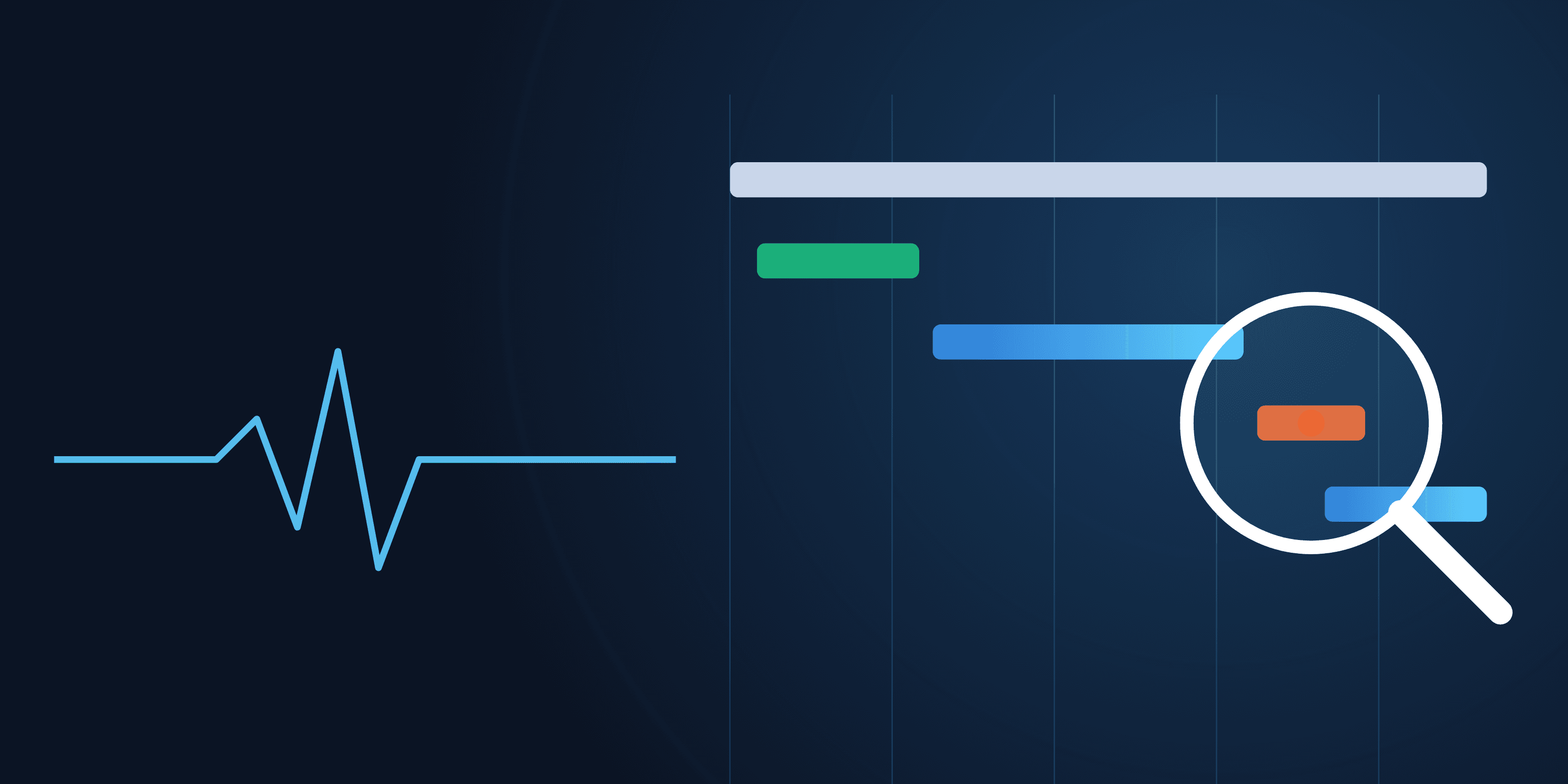
Tracing is the backbone of LLM observability. One user request becomes one trace, and every step inside it becomes a span with a start time, a duration and attributes. Figure 1 shows a support assistant that retrieves documents, calls a model, checks an order through a tool, and calls the model again to write the answer.
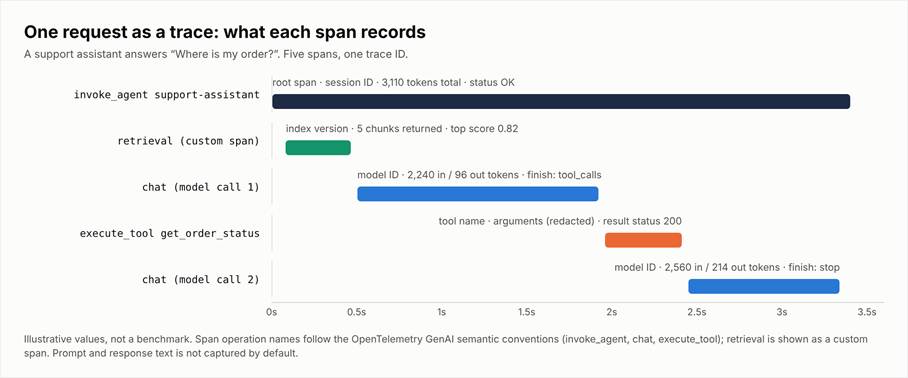
Figure 1. A single request as a trace. Each span stores timing, model, token counts, finish reason and status.
For each span, record at least the following:
Table 3. What to record per step
| Step | Record | Why |
|---|---|---|
| Agent / root span | Trace ID, user or session ID (pseudonymized), total tokens, status | Ties every step to one request and one user journey |
| Retrieval | Index name and version, number of chunks, top similarity score | Explains stale or missing context |
| Model call | Model ID and version, input and output tokens, latency, finish reason | Separates model problems from application problems |
| Tool call | Tool name, arguments (redacted), result status, duration | Shows failed or repeated actions |
| Response | Evaluation scores, user feedback, guardrail flags | Links quality to the exact path that produced it |
OpenTelemetry now has semantic conventions for generative AI that define span types for agent invocation, model calls and tool execution, along with standard metrics for operation duration and token usage (OpenTelemetry overview). The conventions are still marked as in development, so attribute names can change; using them anyway keeps data portable between backends.
Prompt and response text needs separate handling. It often contains personal or confidential data, and OpenTelemetry leaves content capture off by default. Capture it only with redaction or user consent, store it with shorter retention than metrics, and restrict who can read it.
Not sure which signals your LLM application should capture?
CodeGeeks Solutions can review a current or planned LLM feature and map which traces, metrics and alerts it needs, who should own each one, and what data must stay out of logs. Talk to the AI transformation team about a signal review for one application.
AI and LLM observability for RAG and agents
RAG pipelines and agents fail in ways a single model call never does. A retriever can return nothing useful while the model still produces a fluent answer. An AI agent can call the same tool twelve times because each result looks slightly wrong to it. This is where ai agent observability becomes its own discipline: the trace has to show the plan, every step taken and every handoff, not only the final response. The signals worth adding first:
- Retrieval hit rate: the share of requests where at least one retrieved chunk is relevant. A drop usually points to a new document type or a broken ingestion job.
- Index freshness: the age of the newest document per source.
- Tool-call failures: errors, timeouts and rejected arguments per tool, split by agent.
- Loop count and step depth: how many steps an agent takes per task, with a hard ceiling that stops runaway runs.
- Tokens per completed task: cost measured against the outcome, not the request, so long agent runs are visible.
Context deserves the same scrutiny as output: what an agent receives at each step shapes every decision it makes, as described in the CodeGeeks article on agentic context engineering.
LLM observability tools and platforms
Most "top 10" lists are written by vendors who place their own product first. A more useful approach is to score candidates against criteria that fit the stack; the checklist below works for commercial, open-source and in-house options alike.
Table 4. Selection checklist for an LLM observability platform
| Criterion | What to check |
|---|---|
| OpenTelemetry support | Accepts OTel GenAI spans and exports data without proprietary agents |
| Agent and tool tracing | Shows nested agent steps, tool arguments and handoffs in one trace |
| Evaluations | Runs online quality checks on sampled traffic and stores scores with traces |
| Cost attribution | Breaks tokens and spend down by feature, customer and model |
| PII redaction and data location | Redacts before storage; lets the team choose region and retention |
| Alerting | Alerts on quality and cost, not only latency; routes to existing on-call tools |
| Retention | Separate retention for metrics, traces and prompt content |
| Pricing model | Predictable at production volume (per trace, per span, per seat or self-hosted) |
For LLM observability, build versus buy usually comes down to volume and data rules. A managed platform is faster to start and fine for most teams; a self-hosted stack makes sense when prompts cannot leave the company's cloud or trace volume makes per-event pricing expensive. In either case, OpenTelemetry support is the best protection against lock-in, because instrumentation written once can be pointed at a different backend later.
How to implement LLM observability
Five steps, each with one deliverable, take a team from no visibility to a working setup.
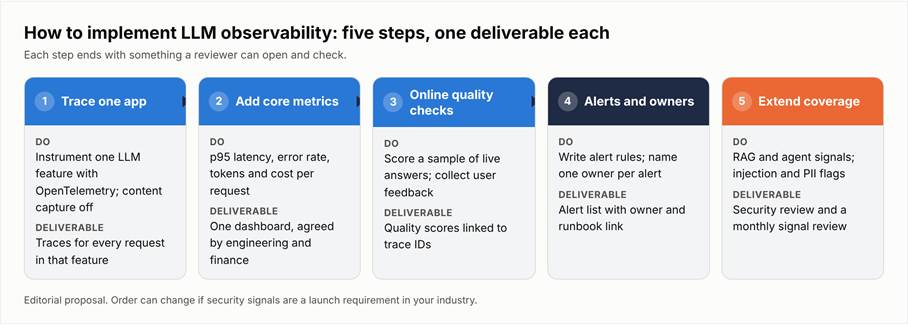
Figure 2. Five implementation steps, each ending with a deliverable a reviewer can check.
- 1. Trace one application. Pick the LLM feature with the most users or the most complaints and instrument it with OpenTelemetry. Deliverable: traces for every request in that feature, with content capture switched off.
- 2. Add core metrics. Latency p95, error rate, tokens and cost per request. Deliverable: one dashboard that engineering and finance both accept as correct.
- 3. Add online quality checks. Score a sample of live answers for groundedness and relevance, and collect user feedback in the same place. Any change in prompt design is then tested against the same scores before release. Deliverable: quality scores attached to trace IDs.
- 4. Set alerts and owners. Turn the metrics table into alert rules and give each rule a named owner and a short runbook. Deliverable: an alert list that someone has signed off.
- 5. Extend to RAG, agents and security review. Add retrieval and tool signals, prompt injection and PII flags, and a monthly review of what the signals show. Deliverable: a security review and a standing review meeting on the calendar.
Common mistakes
- Watching only infrastructure metrics. CPU and uptime say nothing about wrong answers.
- Storing raw prompts without redaction. Logs become the largest store of sensitive data in the company.
- Skipping quality checks. Without evaluations, the first sign of drift is a customer complaint.
- Alert noise. Twenty alerts with no owner train people to ignore the channel.
- Buying a tool before naming owners. A platform shows problems; only people fix them.
How CodeGeeks Solutions can help
CodeGeeks Solutions is an AI-native product engineering partner. The team helps companies automate operations, modernize legacy systems and build AI-enabled products on secure, dependable data foundations, with logging, testing and monitoring planned into the architecture from the start.
One example is the Inspection Management Platform, where CodeGeeks built an AI-assisted workflow around field inspections and reporting. According to the case study, the platform delivered 60% faster access to reports, 2.5x faster onboarding and a 42% improvement in data accuracy. These are workflow results rather than observability metrics, but they show the kind of production AI system that needs the signals described above. The same approach applies when CodeGeeks moves from single LLM features to AI agents that act on business systems.
Planning to put agents into real business workflows?
If the next step is moving from a single LLM feature to agents that act on company systems, CodeGeeks Solutions can design those workflows with tracing, limits and approval steps built in. See how CodeGeeks approaches AI automation and book a working session on one workflow.
FAQ
What is LLM observability?
LLM observability is the ability to reconstruct and explain what a large language model application did on any given request.
It combines traces (the path a request took through retrieval, model calls and tools), metrics (latency, tokens, cost, error rates) and evaluations (scores for answer quality and safety). The goal is diagnosis: when an answer is wrong, slow or expensive, the team can find the exact step that caused it. This matters because LLM failures are often silent.
The application returns a normal response, the server logs show success, and the answer is still incorrect or unsafe. In practice, an observability setup for LLMs records model and prompt versions, retrieved context, token counts per step and quality scores, then links all of it to one trace ID.
What is the difference between LLM monitoring and LLM observability?
Monitoring tells a team that something is wrong; observability tells them why. Monitoring works with aggregated numbers and thresholds, such as p95 latency, error rate or daily token spend, and raises an alert when one of them crosses a limit.
Observability works with the detailed record behind those numbers: individual traces, the context that was retrieved, the tool calls an agent made and the quality score of each answer. For example: A monitoring alert fires because the share of negative user feedback doubled overnight.
Observability data then shows that the rise is limited to questions about one product line and that the retriever has been returning an outdated price sheet since a content update. Evaluations are the link: they are aggregated into metrics for alerting and stored per trace for debugging.
What should I monitor in a production LLM application?
Start with five groups of signals: performance, cost, quality, safety, and RAG or agent behavior. Performance means end-to-end and per-step latency plus error and timeout rates.
Cost means tokens and spend per request, per user and per feature, so a single expensive workflow cannot hide in the total. Quality means groundedness, answer relevance and direct user feedback. Safety means prompt injection flags and sensitive data in outputs, which correspond to risks in the OWASP Top 10 for LLM Applications.
For retrieval and agents, add retrieval hit rate, index freshness, tool-call failures and the number of steps per task. More important than the exact list is that each signal has an owner, an alert rule tuned to the team's own baseline and a short runbook. A smaller set that people act on is worth more than fifty charts nobody reviews.
Do I need a dedicated LLM observability platform, or can I use my existing tools?
Existing tools can cover part of the job, and for an early pilot they may be enough. Most APM and logging products can store traces and metrics, and many now accept OpenTelemetry data, including the generative AI conventions.
The gaps usually appear in three places: online evaluations of answer quality, cost attribution by feature or customer, and views that show nested agent steps clearly. A dedicated LLM observability platform fills those gaps out of the box, while an existing stack may need custom work for each. The decision depends on volume, data rules and team capacity.
If prompts and responses must stay inside the company's cloud, a self-hosted option or an extension of the current stack may be required. Whichever route is chosen, instrument with OpenTelemetry so the data can move to a different backend later without rewriting the application.
How does OpenTelemetry fit into LLM observability?
OpenTelemetry provides the vendor-neutral way to collect LLM telemetry. It is an open standard for traces, metrics and logs, and its generative AI semantic conventions define common names for agent invocations, model calls, tool executions, token counts and finish reasons.
When an application is instrumented with these conventions, the same data can be sent to an open-source backend, a commercial observability product or both, without changing application code. That portability is the main reason to adopt it early. The conventions are still marked as in development, so some attribute names may change, so pin library versions.
OpenTelemetry also takes a cautious default on privacy: capturing the actual text of prompts and responses is switched off unless a team enables it. OpenTelemetry does not score answer quality on its own; evaluations still come from a separate tool or pipeline.