
TL;DR
- This guide covers the best vibe coding tools, from full IDE replacements to browser-based prototyping platforms.
- You will learn what separates vibe coding software from traditional IDEs and basic AI autocomplete plugins.
- Each tool is evaluated by use case - UI generation, backend scripts, full-stack apps, and API prototypes.
- The comparison table shows free tier availability, deployment options, and code export capability at a glance.
- Cursor and Windsurf are best for developers working on existing codebases; Bolt.new and Lovable suit fast product launches.
- GitHub Copilot Workspace integrates directly with your repo workflow, while v0 by Vercel targets React/Next.js component generation.
- The guide explains what these AI coding tools cannot handle yet - security, architecture decisions, and complex integrations.
- You will find clear selection criteria to match the right vibe coding platform to your technical background and project type.
Introduction
A year ago, describing your app idea to an AI and watching it build a working prototype felt like a demo trick. Today, it is a legitimate workflow used by solo founders, product teams, and agencies on tight deadlines. Vibe coding - the practice of directing AI to write code through natural language - has shifted from novelty to necessity for anyone who needs to ship fast.
The category has grown quickly. What started with basic AI autocomplete has expanded into full vibe coding platforms that manage files, run tests, deploy to production, and iterate on feedback within a single interface. For builders without deep technical backgrounds, these tools lower the barrier to entry. For experienced developers, they compress the time between idea and working code.
This guide gives you a practical breakdown of the best vibe coding tools. No rankings for the sake of rankings - just honest assessment of what each tool does well, where it falls short, and which workflow it actually fits.
What Are Vibe Coding Tools?
Vibe coding refers to AI-powered coding environments where your intent drives implementation. Instead of writing syntax line by line, you describe what you want - a contact form, a REST endpoint, a data dashboard - and the AI generates functional code based on your description.
This is meaningfully different from traditional integrated development environments (IDEs) like VS Code or IntelliJ, where the developer writes every line and the tool provides syntax highlighting, linting, and basic autocomplete. It is also different from AI completion plugins like early GitHub Copilot, which suggest the next line based on context but leave all decisions to the programmer.
Vibe coding AI assistants operate at a higher level of abstraction. They understand project context, manage multiple files simultaneously, suggest architecture, and in many cases handle deployment. Microsoft describes vibe coding as a shift in who can build apps - from developers who know every API and syntax rule to anyone who can articulate what they want to create.
The practical difference matters: with a traditional IDE, you control implementation. With a vibe coding IDE, you control direction. That trade-off defines which tool works for your situation.
Best Vibe Coding Tools
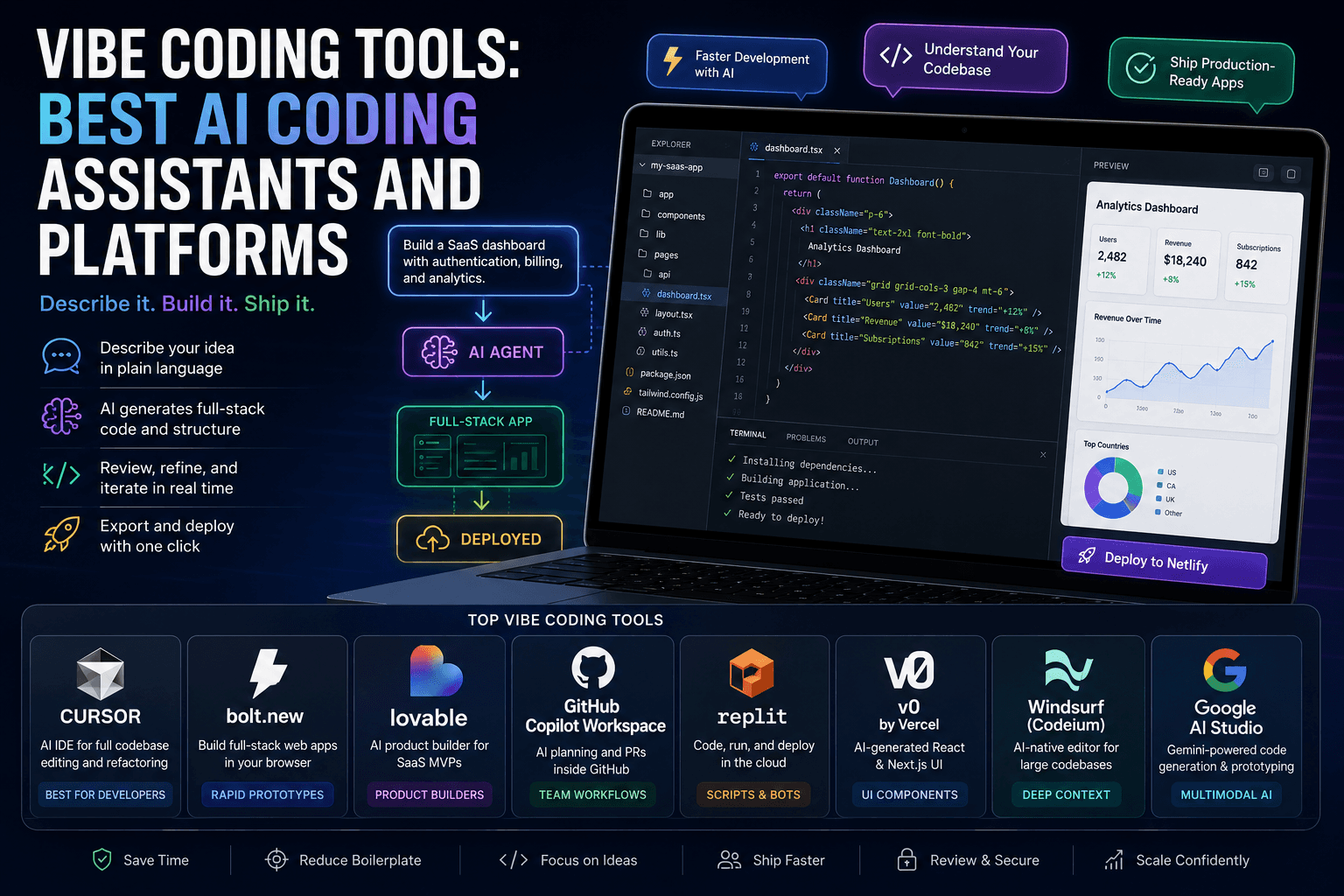
1. Cursor
Overview: Cursor is a full vibe coding IDE built on top of VS Code. It maintains the familiar editor interface while adding deep AI integration - multi-file edits, codebase-aware chat, and agent mode that executes tasks across the entire project. Designed for developers who want AI assistance without giving up direct control over their code.
Best for: Refactoring legacy code, navigating large codebases, implementing features across multiple files, and teams already using VS Code.
- Pros: Excellent codebase awareness; supports .cursorrules for custom instructions; agent mode can run terminal commands; familiar interface
- Cons: Free tier is limited; subscription required for advanced models; steeper learning curve than browser-based tools
See how Cursor compares to other approaches in our vibe coding vs traditional coding breakdown.
2. Bolt.new
Overview: Bolt.new is a browser-based vibe coding app that generates full-stack web applications from a single prompt. It spins up a project in the browser, installs dependencies, and produces deployable code without any local setup. Built for speed - from idea to working prototype in minutes.
Best for: Landing pages, SaaS prototypes, hackathon projects, and anyone who needs a deployable UI without configuring a development environment.
- Pros: Zero setup; one-click Netlify deployment; clean code export; supports popular frameworks
- Cons: Context window limits on larger projects; less suitable for complex backend logic; can require cleanup before production use
3. Lovable
Overview: Lovable positions itself as an AI-powered product builder. You describe a product idea, and Lovable generates a functional web app with authentication, database, and UI components wired together. It targets non-technical founders who want to validate product ideas without hiring a developer.
Best for: SaaS MVPs, internal tools, startup prototypes, and product managers testing user flows before committing to full development.
- Pros: Handles auth and database setup automatically; GitHub sync; good for rapid validation
- Cons: Less control over implementation details; hosting is tied to the platform; production apps require cleanup
4. GitHub Copilot Workspace
Overview: GitHub Copilot Workspace brings AI planning directly into the GitHub workflow. Given an issue or task, it generates a plan, edits the relevant files, and opens a pull request - all within the GitHub interface. It is less about generating apps from scratch and more about accelerating development tasks within an existing repository.
Best for: Development teams working in GitHub, implementing scoped features, and turning issue descriptions into code changes with minimal context switching.
- Pros: Deep repo context; integrates with existing PR workflow; reduces back-and-forth between planning and coding
- Cons: No free tier; limited to GitHub repositories; better for iteration than greenfield development
5. Replit AI
Overview: Replit combines a cloud-based IDE with AI code generation, offering an all-in-one environment where you can write, run, and host code without leaving the browser. Replit AI handles code generation, debugging, and explanation - useful for learning and quick scripting as much as for building apps.
Best for: Scripts, bots, automation tools, educational projects, and quick backends where deployment simplicity matters more than infrastructure control.
- Pros: Built-in hosting; collaborative by default; broad language support; good for beginners
- Cons: Performance limits on free tier; less suitable for production-grade applications
6. v0 by Vercel
Overview: v0 is Vercel's AI UI generator, purpose-built for React and Next.js components. You describe a UI element or page layout, and v0 produces clean, Tailwind-styled JSX that you can drop directly into a Next.js project. It is a focused tool - not a full vibe coding platform, but exceptionally good at what it does.
Best for: Next.js and React developers who need polished UI components fast, design-to-code workflows, and teams building on the Vercel stack.
- Pros: Clean JSX output; Tailwind integration; direct Vercel deployment; excellent for component generation
- Cons: Narrow scope (UI only); requires React knowledge to use effectively; not suited for full-stack generation
7. Windsurf (Codeium)
Overview: Windsurf, developed by Codeium, is an AI-native code editor built for developers who work with large, complex codebases. Its Cascade agent understands multi-file context deeply and can execute multi-step tasks - refactoring, adding features, fixing bugs - across the entire project without losing track of dependencies.
Best for: Large codebase navigation, enterprise-scale refactoring, and developers who need strong context retention across hundreds of files.
- Pros: Strong multi-file context; free tier available; fast AI responses; good for existing projects
- Cons: Smaller community than Cursor; fewer integrations; still maturing compared to established IDEs
8. Google AI Studio (Vibe Code Mode)
Overview: Google AI Studio's vibe code mode leverages Gemini models to generate code from text and image inputs. It is particularly strong for multimodal prompts - you can upload a screenshot of a UI and ask AI Studio to recreate it in code, or describe an API and get a working prototype. Integrates naturally with Google Cloud services.
Best for: Multimodal prototyping, Google Cloud integrations, API exploration, and developers already in the Google ecosystem.
- Pros: Multimodal input support; generous free tier; strong for Google Cloud projects; Gemini 1.5 Pro context window
- Cons: Less polished IDE experience than Cursor or Windsurf; better as a prototyping tool than a daily drive
How to Choose the Right Vibe Coding Tool
With this many ai vibe coding tools available, the choice depends on four practical factors:
Step 1 - Define your output type. Are you building a UI, an API, a script, or a full-stack app? v0 is purpose-built for React UI components. Bolt.new and Lovable excel at full-stack web apps. Replit fits scripts and bots. Cursor and Windsurf handle any output type but require more setup.
Step 2 - Evaluate context window and codebase awareness. For greenfield projects under a few hundred lines, most tools work. For large existing codebases, Cursor and Windsurf have meaningfully better multi-file context. GitHub Copilot Workspace wins for repo-native tasks.
Step 3 - Check deployment and export options. If you need one-click deployment, Bolt.new (Netlify), Lovable (built-in hosting), and Replit (built-in) are the strongest. If you want to own your infrastructure, Cursor, Windsurf, and v0 export clean code for any deployment pipeline.
Step 4 - Match the tool to your technical background. Non-technical founders will get the most from Lovable and Bolt.new. Developers with existing projects should evaluate Cursor or Windsurf. Teams in the GitHub workflow should test Copilot Workspace. Those building on Google Cloud infrastructure should explore Google AI Studio.
For a detailed look at how these workflows compare, the Forbes breakdown of vibe coding covers the broader landscape well.
Vibe Coding Tools Comparison Table
What These Vibe Coding Tools Can’t Do (Yet)
Despite the rapid progress, there are three areas where current vibe coding software consistently falls short:
Security review. AI-generated code can introduce vulnerabilities - insecure authentication flows, exposed API keys, or SQL injection risks. None of these tools perform meaningful security audits. Code that works is not the same as code that is safe. Production deployments require a manual security pass or dedicated tooling.
Long-term architecture decisions. Vibe coding tools optimize for immediate output. They do not reason about scalability, maintainability, or how today’s decisions affect a codebase six months from now. Architecture requires human judgment informed by business context that an AI cannot infer from a prompt.
Complex integrations without cleanup. Connecting an AI-generated app to third-party services, legacy systems, or custom authentication often produces brittle code that works in demos but breaks under real conditions. The last 20% of integration work - error handling, edge cases, retry logic - still needs an experienced developer.
For best practices on AI-assisted refactoring, the CodeGeeks blog covers common failure modes and how to avoid them.
How CodeGeeks Solutions Helps After Vibe Coding
Vibe coding tools are strong at generating the first 70-80% of an application. The remaining work - security hardening, architecture review, performance optimization, and production-readiness - is where CodeGeeks Solutions steps in.
The Vibe Coding Cleanup as a Service offering is built specifically for teams who have used AI tools to build a prototype and need it brought to production standard. This includes code review, security audit, refactoring for maintainability, and documentation.
For organizations dealing with legacy systems alongside new AI-generated code, the AI-driven legacy modernization services provide a structured path from inherited codebases to modern, maintainable architecture.
Practical outcomes across both service lines are covered in the CodeGeeks case studies. If your team is exploring AI automation services for business workflows, there are relevant examples there as well.
Final Thoughts
The best tools for vibe coding are not interchangeable. Cursor and Windsurf serve developers who want AI-augmented control over complex projects. Bolt.new and Lovable serve builders who want speed over precision. v0 fills a specific niche in UI generation. GitHub Copilot Workspace fits teams living inside the GitHub workflow.
Asking “what tools do you use for vibe coding” is the right question, but the honest answer depends on what you are building, how technical your team is, and what comes after the prototype. Choose the tool that fits your output type, not the one with the most social media attention.
And when the prototype is ready for production, the cleanup work matters as much as the generation did.